 BYTEASSUREStart a review
A pre-launch security audit for SaaS is mostly a test of boundaries. Can one customer see another's data? Can a member do what only an owner should? Can a free account act like a paid one? Can someone who was removed keep their access? Can a script run up your bills? Answer those with direct API requests, not by clicking around the interface, and you have done most of what matters.
Below, each boundary gets what to test, how, and what to keep as proof. It assumes you have run the general one-page pre-launch security checklist; this is the layer that appears once you have workspaces, roles and subscriptions. You need a staging environment with production-like configuration and more test accounts than feels necessary.
What a pre-launch security audit for SaaS covers
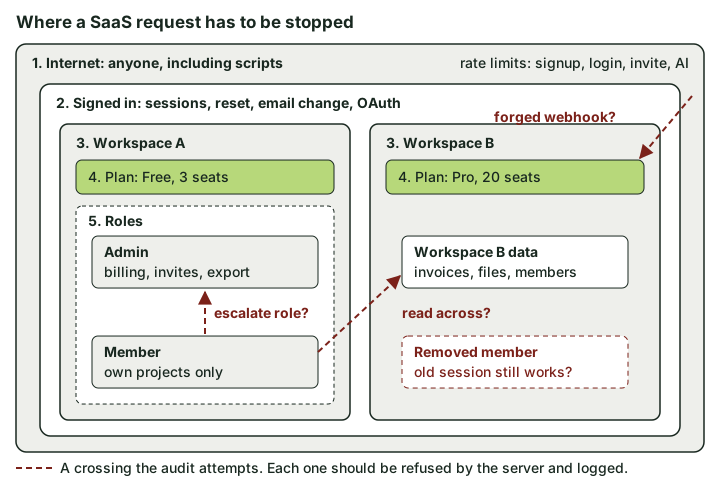 Each zone is a boundary the server has to enforce. The audit tries every red arrow and expects a refusal.
Whether you call it an audit or an MVP security review before launch, set up these accounts once and reuse them throughout:
- Workspace A on the free plan: Alice (owner), Bob (member).
- Workspace B on a paid plan: Carol (owner), Dan (member).
- One user who belongs to both workspaces, with different roles in each.
- One user you will remove from workspace B halfway through testing.
Capture a token or cookie for each, plus a few record IDs per workspace. Most tests below are the same request sent with the wrong person's credentials.
The routes in the examples (/api/workspaces/..., /api/members/me and so on) are placeholders for whatever your app actually exposes, and staging.example.com stands for your own staging environment. Run all of this against your own staging app with test accounts, never production and never anyone else's service.
Tenant isolation, invites and removed members
The core question is whether the server derives the workspace from trusted membership data, or believes whatever workspace ID the browser sends. The multi-tenant authorization article covers the design; here is the test.
Two requests cover the main shapes. First Bob (workspace A) asks for workspace B's projects; then he asks for one of B's invoices by its own ID, with no workspace in the path:
curl -s -w "\n%{http_code}\n" \
  -H "Authorization: Bearer $BOB_TOKEN" \
  https://staging.example.com/api/workspaces/$WS_B/projects

curl -s -w "\n%{http_code}\n" \
  -H "Authorization: Bearer $BOB_TOKEN" \
  https://staging.example.com/api/invoices/$INVOICE_IN_B
Good looks like a 403 or 404 with no data. Read the body, not just the status: an empty 200 may be luck. A 200 with Carol's invoice is the finding.
Repeat for writes. Can Bob create a project with "workspace_id": "$WS_B" in the body, or move a record from A into B? Give file storage its own pass, because storage paths and signed URLs often bypass the API checks.
Invites are where tenant bugs like to hide:
- Have Carol invite a new address, say
erin@, to workspace B, then accept that invite while signed in as Bob. It should fail, or at least bind to the invited email address rather than whoever clicks. - Reuse an accepted invite link. It should be dead.
- As Bob (a member), call the invite endpoint directly with
"role": "owner". If members cannot invite, it should fail outright; if they can, never above their own role. - As Alice, send an invite request with workspace B's ID.
Leaving is the half everyone forgets. Remove a user from workspace B, then replay their old token against B. If membership or roles are baked into JWT claims, removal may not take effect until the access token expires (an hour is a common default, and is Supabase's). Decide whether that window is acceptable, and check that API keys the user created are revoked too. Also try removing the last owner (a workspace nobody can manage is a support ticket waiting to happen).
Evidence to keep: the request and response for each cross-workspace attempt, with the account used and the date. A short table works well.
| Test | Account | Target | Expected | Result |
|---|---|---|---|---|
| Read project list | Bob (A, member) | Workspace B | 403/404, no data | |
| Read invoice by ID | Bob (A, member) | Invoice in B | 403/404, no data | |
| Move record to B | Bob (A, member) | Project in A | Rejected | |
| Accept someone else's invite | Bob | Invite sent to erin@ | Rejected | |
| Replay token after removal | Removed user | Workspace B | 401/403 |
Roles and admin functions, enforced on the server
Hiding the "Billing" tab from members is a user-experience decision. It is not access control. The test is to find every admin action and call it directly as a member.
As Alice, perform each owner-only action (change plan, invite, remove member, export, delete workspace, rotate API key) with the network panel open and copy each request as cURL. Swap in Bob's token and resend. Every one should be refused.
Then look for mass assignment. Profile and membership update endpoints often accept more fields than the form shows:
curl -s -X PATCH https://staging.example.com/api/members/me \
  -H "Authorization: Bearer $BOB_TOKEN" \
  -H "Content-Type: application/json" \
  -d '{"display_name":"Bob","role":"owner"}'
If Bob is now an owner, that is critical. Try is_admin, plan, workspace_id and email_verified too.
Then use the user in both workspaces: owner powers in A must not carry into B (checks asking "owner anywhere?" fail this). Support dashboards and impersonation tools are admin functions too, usually the least protected. The OWASP Authorization Cheat Sheet covers deny-by-default checks.
Evidence to keep: a list of every privileged action, the endpoint behind it, and the member's response when calling it.
Billing state, plan limits and webhooks
Billing bugs are security bugs when they hand out paid features or mark a workspace as paid without payment.
Plan limits enforced on the server. If the free plan allows three seats, add a fourth through the API rather than the interface. Then test the race: send ten "create project" requests in parallel when the project limit is one away. A check-then-insert without a transaction or database constraint will often let several through.
seq 1 10 | xargs -P 10 -I{} curl -s -o /dev/null -w "%{http_code}\n" \
  -X POST https://staging.example.com/api/projects \
  -H "Authorization: Bearer $ALICE_TOKEN" \
  -H "Content-Type: application/json" -d '{"name":"race-{}"}'
Webhook verification. With Stripe in test mode, post a hand-made, unsigned event to your billing webhook. It should be rejected before any state changes. Stripe signs the raw body, so frameworks that parse JSON first break verification and tempt people to switch it off. Confirm real events still work with the Stripe CLI: run stripe listen --forward-to localhost:3000/api/stripe/webhook (your own port and route), then stripe trigger customer.subscription.deleted in a second terminal. The trigger creates the test objects it needs in your test account. Stripe webhook verification covers duplicates and ordering.
Downgrade, cancel and failed payment. Stripe's subscription webhooks guide lists the events that matter, such as customer.subscription.deleted and invoice.payment_failed. The dangerous gap is access that never ends because the deletion event is not handled. A workspace with 12 members on a 3-seat plan after downgrading also needs a defined rule. And if the checkout request carries a price ID, swap it for a cheaper one; the server should choose.
Evidence to keep: the over-limit and parallel request results, the rejected unsigned webhook (status and log line), and the entitlement state after each lifecycle event.
The authentication lifecycle
Login usually works. The edges around it are where accounts get taken over.
Password reset. The link should be single use, expire quickly and not reveal whether the email is registered. Two tests people skip: on staging, request a reset with a different Host header and see whether the emailed link points there (if so, an attacker can harvest reset tokens), and check the reset page loads no third-party scripts that can see the token. A reset should end other sessions. The OWASP Forgot Password Cheat Sheet is a sensible baseline.
Email change. It should need recent authentication, confirmation from the new address and a notice to the old one. Otherwise a stolen session becomes a permanent takeover in one request.
Session revocation. Copy a session cookie, log out, and replay the cookie. If it still works, logout only cleared the browser. Repeat after a password change and after "sign out of all devices", if you offer it.
OAuth redirect URIs. The current OAuth security guidance, RFC 9700, requires exact string matching of redirect URIs (with a narrow exception for ports on localhost). Try redirect_uri values on another domain, a lookalike subdomain and an extra path. Then read the allowed list in your auth provider: where wildcards are accepted, https://*.vercel.app/** would match anyone's project on that platform. Confirm state is checked on return.
Evidence to keep: the reset email with its link host, the replayed cookie responses, and a screenshot or export of the configured redirect list.
Data export, deletion and privacy-law basics
UK and EU users can ask for a copy of their data and, often, for erasure. Under the UK GDPR you must answer a subject access request without undue delay and within one month of receiving it, extendable only in limited cases (ICO guidance on responding to a request). You do not need a self-service button at launch, but you do need to know where the data lives. (A security note, not legal advice.)
Security tests for export:
- A member's export contains their data, not the whole workspace. A workspace export is owner-only.
- The export runs with the requesting workspace's context. Trigger an export in A and check that nothing from B appears.
- The download link expires and cannot be guessed. Try the link signed out, and try it a day later.
For deletion, give a test user data everywhere you store it (rows, uploads, a Stripe customer, your email provider, analytics), delete the account, then search for their ID and email. Storage buckets are the usual surprise. Backups can age out on their own schedule, but write that schedule down.
Evidence to keep: a data map listing where personal data is stored, and the before-and-after search for a deleted test user.
Logging enough to investigate an incident
The test here is a question, not a scan. Pick an event from your testing and try to answer it from logs alone: who exported workspace B's data on Tuesday, from which IP, and were they an owner at the time?
That needs security events with a consistent shape: UTC timestamp, actor, workspace, action, target, result, IP and request ID. Log sign-ins and failures, resets, email and password changes, role changes, invites, removals, exports, billing changes, impersonation and denied authorisation checks. Leave out passwords, session tokens, reset links and full payment payloads. The OWASP Logging Cheat Sheet covers the detail.
Check how long your host keeps logs. On some plans it is days, shorter than the usual gap between an incident and anyone noticing.
Evidence to keep: the log query that answered your test question, and a note of where logs are kept and for how long.
Abuse controls on endpoints that cost money
Some attacks need no bug. They use the product as built, just a lot. OWASP calls this unrestricted resource consumption in the API Security Top 10.
| Endpoint | What abuse looks like | Control to test |
|---|---|---|
| Signup | Bot accounts farming free-tier credits | Rate limit per IP, email verification before credits |
| Login | Credential stuffing | Limit per account and per IP, no user enumeration |
| Password reset | Email bombing a victim | Limit per address and per IP |
| Invite | Your domain sending spam to arbitrary addresses | Per-workspace daily cap, no free-text message on free plans |
| AI or LLM calls | A single user running up a four-figure model bill | Per-user and per-workspace quotas, server-set model and token limits, a spend limit at the provider where one exists |
Test each one against your own staging environment and watch for the point where responses turn into 429s:
for i in $(seq 1 50); do
  curl -s -o /dev/null -w "%{http_code} " -X POST \
    https://staging.example.com/api/auth/login \
    -H "Content-Type: application/json" \
    -d '{"email":"bob@example.test","password":"wrong-password"}'
done; echo
If the 50th attempt still returns 401 rather than 429, there is no limit. For AI endpoints, also change the model name or max_tokens in the body; if the server accepts it, users can pick your most expensive model.
Evidence to keep: the request number at which each limit kicked in, and the provider spend limit setting.
Pre-launch pentest or review, and what each costs
A pre-launch pentest for a startup and a code-assisted review overlap more than the names suggest. Most of the above is authorisation and business logic, which a reviewer reading the code finds faster. A tester working without code proves what an outsider can actually do.
| You need... | Better fit |
|---|---|
| Confidence that tenants, roles and billing hold before your first paying customers | Review with code access and real test accounts |
| A report an enterprise buyer's security questionnaire will accept | Penetration test with written rules of engagement |
| Testing of a public API, mobile client or integrations used by third parties | Penetration test |
| A quick external look at headers, exposed files and secrets in the bundle | A passive snapshot (it will not test access control) |
If you are comparing pre-launch pentest prices, our penetration test is £2,999 for one small web app and its API with one retest, and the deep review is £2,249. Whoever you hire, the scope matters more than the label. Read what a credible penetration-test scope should say and make sure tenant isolation and billing state are named in it, not assumed.
If you run all of this yourself, keep the tables and responses in one folder. That is your launch evidence, and the first thing a reviewer will ask for.