 BYTEASSUREStart a review
A Firebase security rules check comes down to one question: when a request arrives from a browser with your public config, who do your rules actually let in? Not who your app's screens let in. Firebase clients talk straight to Firestore, Cloud Storage and the Realtime Database, so the rules are the only thing standing between any visitor and your data. This guide shows the rule patterns that look finished but are not, how to probe your own project from outside, how to test rules properly with the Rules Playground and the Emulator, and a two-user test that settles "is my Firebase app secure?" with evidence rather than a feeling.
If you have read our Supabase material, this is the same problem with different syntax. Supabase has USING (true); Firebase has if request.auth != null. Both read as protection and both, on most apps, protect nothing. (The recorded Supabase demonstration shows what that looks like from a second account.)
Only run the outside-in checks below against a Firebase project you own. Use a staging project if you have one.
First, the web API key is not the problem
Founders often find the Firebase config in their bundle (apiKey: "AIza...") and panic, or a scanner flags it. Firebase's own docs say API keys for Firebase services only identify your project and app; they do not grant access to data. Authorisation comes from Security Rules (and App Check). So the key in your bundle is expected.
Two caveats from the same page. First, make sure the key is restricted to the APIs Firebase needs, and use separate keys for things like Maps. Second, never allow the Gemini Developer API on a key that ships to the browser; give it its own restricted key on the server. If an AI feature calls Gemini from the browser with your Firebase key, check that key's API restrictions in the Google Cloud console, because that is a real finding. For everything else, stop worrying about the key and start reading the rules, because the key plus open rules is the whole attack.
The four rules that look finished
Open the Firebase console, then Firestore > Rules, Storage > Rules and Realtime Database > Rules. Or read firestore.rules, storage.rules and database.rules.json in the repo, but check the console too: what is deployed is what counts, and AI tools sometimes write a rules file that never gets deployed.
You are looking for four shapes, in order of how bad they are.
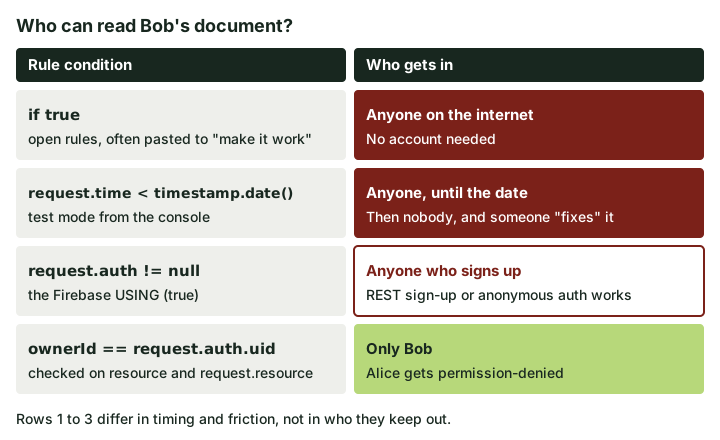 Only the bottom row is a boundary. The other three differ in timing, not in who they keep out.
1. allow read, write: if true; Firebase's insecure rules page puts it bluntly: anyone who guesses your project ID can steal, modify or delete the data. The Storage version is just allow read, write; with no condition, and the Realtime Database version is ".read": true, ".write": true at the root.
2. Firestore rules in test mode. When you create a Firestore database in test mode, the console writes something like this (the date is set roughly a month ahead):
match /{document=**} {
  allow read, write: if request.time < timestamp.date(2026, 12, 11);
}
This is if true with a timer. Until the date, your database is open to the internet. When the date passes, every request is denied, the app breaks, and the person fixing it under pressure either pushes the date forward (still open) or swaps in rule three because it "requires login". That swap is the most common way a Firebase app ends up in production with no real rules.
3. allow read, write: if request.auth != null; This is the Firebase equivalent of the Supabase USING (true) problem. It checks that someone is signed in, not who. The insecure rules page lists it as a pattern where any logged-in user has read and write access to your entire database.
Founders push back here: "but only my users can sign in". On Firebase, anyone can become one of your users. If email and password sign-in is enabled, the Auth REST API accepts sign-ups with your public API key whether or not your UI has a sign-up page:
# Against your OWN project only. Creates a real test account.
curl -s "https://identitytoolkit.googleapis.com/v1/accounts:signUp?key=$FIREBASE_API_KEY" \
  -H "Content-Type: application/json" \
  -d '{"email":"rules-check+1@yourdomain.example","password":"a-long-test-password","returnSecureToken":true}'
The response contains an idToken. That token satisfies request.auth != null. If anonymous sign-in is switched on, it is even easier: no email needed. (Blocking self-sign-up is possible, through Identity Platform settings or a beforeUserCreated blocking function, but it is not the default, and it is no substitute for proper rules.)
4. An owner check. The rule compares the signed-in user with something in the path or the document:
rules_version = '2';
service cloud.firestore {
  match /databases/{database}/documents {
    match /notes/{noteId} {
      allow read, delete: if request.auth != null
        && resource.data.ownerId == request.auth.uid;
      allow create: if request.auth != null
        && request.resource.data.ownerId == request.auth.uid;
      allow update: if request.auth != null
        && resource.data.ownerId == request.auth.uid
        && request.resource.data.ownerId == request.auth.uid;
    }
  }
}
That is a boundary. Note the update rule checks both the existing document (resource.data) and the incoming one (request.resource.data). Leave out the second half and a user can hand their document to someone else, or, with a create rule written the same lazy way, plant documents in another user's name. It is the Firebase version of a Postgres policy missing its WITH CHECK.
Firestore details that turn a good rule into a bad one
Reading rules one block at a time is how people miss things. A few behaviours to keep in mind:
- Matching rules are OR'd together. If several
matchblocks cover the same document, the rules structure docs say access is allowed if any of the conditions is true. One leftovermatch /{document=**} { allow read: if request.auth != null; }at the bottom of the file overrides every careful owner check above it. Search the file for{document=**}first. - Rules do not cascade to subcollections. A rule on
/users/{userId}says nothing about/users/{userId}/invoices/{id}. With no matching rule, the subcollection is denied, which is safe but often "fixed" with a broad recursive wildcard. - Fields the user can write are fields the user controls. If a user document holds
role: "member"and the update rule only checks ownership, the user can setrole: "admin". Restrict which fields change:
allow update: if request.auth.uid == userId
  && request.resource.data.diff(resource.data).affectedKeys()
       .hasOnly(['displayName', 'photoURL']);
Better still, keep roles in custom claims set from a server with the Admin SDK and check request.auth.token.admin == true. Users cannot edit their own token claims.
- Rules are not filters. Firestore's docs say queries are all or nothing: if a query could return a document the user may not read, the whole query fails. So with an owner rule,
getDocs(collection(db, "notes"))fails andquery(collection(db, "notes"), where("ownerId", "==", uid))works. This matters because the "fix" for a failing list query, made in a hurry, is usually to loosen the read rule. Fix the query instead. - Server code ignores rules. Cloud Functions and servers using the Admin SDK bypass Security Rules entirely. If a callable function takes a document ID from the client and reads it with the Admin SDK, your rules never see that request. Those functions need their own ownership checks.
Storage and Realtime Database rules
Cloud Storage rules have the same shapes. Look for allow read, write;, if request.auth != null across {allPaths=**}, and anything that lets users write outside their own folder. The usual safe pattern scopes the path to the user:
rules_version = '2';
service firebase.storage {
  match /b/{bucket}/o {
    match /users/{userId}/{allPaths=**} {
      allow read, write: if request.auth != null && request.auth.uid == userId;
    }
  }
}
Two Storage-specific gotchas. Download URLs created with getDownloadURL() carry an access token and work for anyone who has the URL, without going through your rules; if you store those URLs in a world-readable document, the files are effectively public. And write covers delete, so a broad write rule lets users remove each other's files, not only upload.
Realtime Database rules are JSON, and they cascade the other way: shallower rules override deeper ones, and a child rule can only add access, never take it away. So ".read": "auth != null" at the root opens the whole tree to every signed-in user, regardless of the careful $uid rules underneath. The pattern you want has nothing at the root and per-user rules lower down:
{
  "rules": {
    "users": {
      "$uid": {
        ".read": "auth != null && auth.uid === $uid",
        ".write": "auth != null && auth.uid === $uid"
      }
    }
  }
}
Is my Firebase database public? Check from outside
With rules read, confirm from the outside with no login. You need your project ID, API key, database URL and bucket name, all of which sit in your firebaseConfig.
# Firestore: list a collection with no auth token
curl -s "https://firestore.googleapis.com/v1/projects/$PROJECT_ID/databases/(default)/documents/notes?key=$FIREBASE_API_KEY"

# Realtime Database: top-level keys only (shallow keeps the response small)
curl -s "$DATABASE_URL/.json?shallow=true"

# Cloud Storage: list objects in the default bucket
curl -s "https://firebasestorage.googleapis.com/v0/b/$BUCKET/o"
Good answers: Firestore returns a PERMISSION_DENIED error, the Realtime Database returns {"error" : "Permission denied"}, Storage returns a 403. Bad answers: documents, keys or a list of items. Repeat the Firestore call for each collection name your app uses (you cannot list collection names from the client, so take them from your code). Then repeat with -H "Authorization: Bearer $ID_TOKEN" using the throwaway account from the sign-up call above. If a stranger's fresh account can list everyone's documents, you are looking at rule three.
Test rules with the Rules Playground and the Emulator
The Rules Playground sits in the console's rules editor for each product. You pick an operation, a document path, whether the request is authenticated and with which UID, add any document data your rule checks, then run it. Two limits: it evaluates the rules in the editor, not necessarily what is deployed, and it tests one request at a time. The simulator docs describe it as a quick check while writing rules. Good for "would Bob's UID be allowed to read Alice's document?"; not good enough to sign off on.
For that, use the Emulator Suite and the @firebase/rules-unit-testing library. It runs your rules locally against fake users and throwaway data, so you can test every operation in seconds and keep the tests in CI.
npm i -D firebase @firebase/rules-unit-testing firebase-tools
npx firebase init emulators      # pick Firestore (and Storage or Database if you use them)
// rules-check.mjs
import { readFileSync } from "node:fs";
import {
  initializeTestEnvironment, assertFails, assertSucceeds,
} from "@firebase/rules-unit-testing";
import {
  doc, getDoc, setDoc, updateDoc, deleteDoc, collection, getDocs, query, where,
} from "firebase/firestore";

const env = await initializeTestEnvironment({
  projectId: "demo-rules-check",
  firestore: { rules: readFileSync("firestore.rules", "utf8") },
});

await env.withSecurityRulesDisabled(async (ctx) => {
  const db = ctx.firestore();
  await setDoc(doc(db, "notes/a1"), { ownerId: "alice", text: "Alice's note" });
  await setDoc(doc(db, "notes/b1"), { ownerId: "bob", text: "Bob's note" });
});

const alice = env.authenticatedContext("alice").firestore();
const stranger = env.unauthenticatedContext().firestore();

await assertSucceeds(getDoc(doc(alice, "notes/a1")));                     // own row
await assertFails(getDoc(doc(alice, "notes/b1")));                        // read Bob
await assertFails(updateDoc(doc(alice, "notes/b1"), { text: "edited" }));  // edit Bob
await assertFails(deleteDoc(doc(alice, "notes/b1")));                     // delete Bob
await assertFails(updateDoc(doc(alice, "notes/a1"), { ownerId: "bob" }));  // hand over
await assertFails(setDoc(doc(alice, "notes/x1"), { ownerId: "bob" }));     // plant
await assertFails(getDocs(collection(alice, "notes")));                   // list all
await assertSucceeds(getDocs(query(collection(alice, "notes"), where("ownerId", "==", "alice"))));
await assertFails(getDoc(doc(stranger, "notes/a1")));                     // no login

await env.cleanup();
console.log("rules check passed");
Run it with npx firebase emulators:exec --only firestore "node rules-check.mjs", which starts the emulator, runs the script and shuts down. initializeTestEnvironment finds the running emulator itself. Any assertion that fails throws, so a clean "rules check passed" means every case behaved. Then write the same cases for Bob, and for Storage paths if you use Storage.
The two-user test against the real project
The emulator proves your rules file. It does not prove that the deployed rules match it, or that your real data uses the fields the rules expect (ownerId in the rules, userId in the documents is a classic). So finish with the real SDK, two real test accounts and real documents, ideally on a staging project.
// two-user.mjs  (run with node; uses your real firebaseConfig)
import { initializeApp } from "firebase/app";
import { getAuth, signInWithEmailAndPassword } from "firebase/auth";
import { getFirestore, doc, getDoc, updateDoc } from "firebase/firestore";

const config = { /* paste your firebaseConfig */ };

async function signInAs(name, email, password) {
  const app = initializeApp(config, name);       // separate app = separate session
  await signInWithEmailAndPassword(getAuth(app), email, password);
  return getFirestore(app);
}

const alice = await signInAs("alice", process.env.ALICE_EMAIL, process.env.ALICE_PASSWORD);
const BOB_DOC = "notes/" + process.env.BOB_DOC_ID;  // a document Bob created in the app

for (const [label, run] of [
  ["read Bob's doc", () => getDoc(doc(alice, BOB_DOC))],
  ["edit Bob's doc", () => updateDoc(doc(alice, BOB_DOC), { text: "changed by Alice" })],
]) {
  try { await run(); console.log("LEAK:", label, "succeeded"); }
  catch (e) { console.log("ok:", label, "->", e.code); }
}
Sign up both accounts through your app's normal flow, have Bob create a note, then run the script as Alice. You want permission-denied for both lines. Anything printing LEAK is the finding, and it is reproducible. Swap the roles and repeat for each collection and Storage path that holds user data. The checklist of what to try is the same five checks we describe in can other users see my data?, and if your app has teams or workspaces, the cross-tenant version in multi-tenant authorization applies too.
What App Check does and does not do
App Check is worth turning on. It makes Firestore, Storage, the Realtime Database and other services reject requests that do not come with a valid attestation from your genuine app, which cuts down scripted abuse and quota theft. But read the App Check docs carefully: it relies on the strength of the attestation provider, and Firebase itself says it does not eliminate all abuse.
The limit that matters here: App Check verifies the app, not the user. A malicious user running your real web app in a real browser gets a valid App Check token. They can then call getDoc on someone else's document from the browser console, and App Check will wave it through. It does nothing about rule three. It is a layer on top of correct rules, never a replacement for them. And it only blocks anything once enforcement is switched on for each service; monitoring mode just counts.
The Firebase security rules check, in short
- Deployed rules contain no
if true, norequest.time <date check and no rule that is onlyrequest.auth != nullon user data. - No catch-all
{document=**}sitting below the specific rules. - Create and update rules check
request.resource.data, not justresource.data. - Users cannot write their own role, plan or organisation fields.
- The three outside-in curls return permission errors, with and without a throwaway token.
- Emulator tests cover read, list, create, update, delete and "hand it over", for two users and no user.
- The two-user script against staging prints no
LEAKlines. - Functions that use the Admin SDK check ownership themselves.
If you would rather have someone else run the two-account test against your live app and hand you the request and response for every check, that is what our 5-day two-account check does. It is not a penetration test, and it will not certify the app, but it will tell you whether Alice can read Bob's data.