 BYTEASSUREStart a review
Your Lovable scan can say RLS is on and still be right about nothing that matters. A policy of USING (true) switches RLS on and then lets every signed-in user read every row. The screen hides it, because your app only asks for the current user's records. The API does not hide it. Anyone with an account can ask for everyone else's.
So "RLS is enabled" is not the question. The question is whether user A can get user B's data. Here are five checks that answer it. They take about 30 minutes on your own app. If one fails, stop there and fix it.
Run them only against an app you own, ideally a staging copy, with test accounts you created.
1. Search the live bundle for secret keys
Open your live site, then DevTools, then Sources (or Network, filtered to JS). Search all files for:
service_rolesb_secret_sk_live_
Any match is a fail. Those values give full access to your database or your Stripe account, and they do not belong in a browser. A legacy Supabase key is a long string starting eyJ; if one appears, decode the middle part locally and look for "role":"service_role".
The Supabase publishable key (sb_publishable_…) or the legacy anon key is expected in the bundle. That is fine on its own. Check 2 is about what it can reach. If you do find a secret, rotate it first and clean up second.
2. Call each table with only the public key
From a terminal, ask for rows with the public key and no signed-in user. Replace the project ref, key and table name with your own:
curl "https://YOUR-REF.supabase.co/rest/v1/profiles?select=*&limit=5" \
  -H "apikey: YOUR_PUBLISHABLE_OR_ANON_KEY"
Repeat for every table that holds anything about a person, an order or a message. A pass is an empty list [] or a permission error. Real rows are a fail, unless the table is meant to be public (a product catalogue, say) and you decided that on purpose.
3. Read every policy as a sentence
In the Supabase SQL editor, list your policies:
select tablename, policyname, cmd, roles, qual, with_check
from pg_policies
where schemaname = 'public'
order by tablename, cmd;
Read each row aloud. USING (true) reads as "anyone can". TO authenticated USING (true) reads as "anyone with an account can". On a table that holds someone else's data, either one is a fail. A good policy names the owner, for example auth.uid() = user_id, or checks membership of the right team.
Also look for tables with no row in this list and RLS turned off. Those are open to the public key entirely, which check 2 should already have caught.
4. Two accounts, one request
This is the check that matters most, and the one scanners cannot do for you, because only you know whose data is whose.
- Sign up as user A and user B in your app.
- As B, create a record: a profile, an order, a note.
- Copy the id of B's record.
- Sign in as A. Using A's session, request B's record by id. Then try to update it. Then try to delete it.
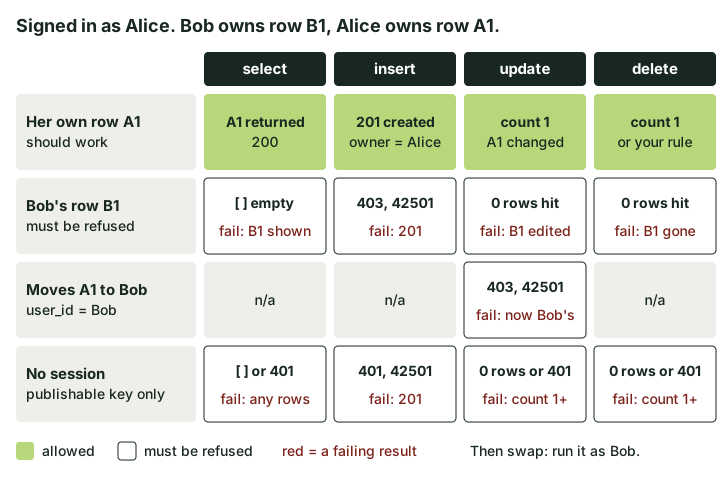 What a pass looks like: A gets nothing back for B's rows, and B's data is unchanged afterwards.
Any success is a fail. So is any of B's data coming back, even a single field. To see what a fail looks like, here is a recorded demo where user A gets user B's note with RLS switched on. Afterwards, sign in as B and confirm nothing changed; an update can quietly succeed even when the response looks empty.
The full version of this test, with code for supabase-js and the raw API, is in how to run a Supabase RLS audit yourself.
5. Private files and payments
Two quick ones to finish.
Storage. Upload a file as user B that should be private (an invoice, an ID photo). Copy its URL, sign out, and open it in a private window. If it loads, the bucket is public or the path is guessable. Private files need a private bucket and signed URLs.
Stripe. If you take payments, open the code that handles Stripe webhooks and confirm it verifies the signature against the raw request body before trusting anything. The success page after checkout is not proof the money arrived; the webhook is.
If something failed
Fix that one thing first. Most failures here are a policy rewrite or moving a key to the server, and your AI tool can help, as long as you rerun the check afterwards rather than trusting its answer.
If a check failed and you are not sure the fix holds, or you take payments or store other people's data and could not run check 4 properly, that is what the 5-Day Two-Account Check is for. With your written permission I sign in as two users on your live app, run these five checks, and send the request and the response for each, a short video of any cross-account leak, and the fix. It is £449, back within five working days of access, and the fee comes off the fix invoice if the fix starts within 14 days.
What this does not tell you
Passing all five does not mean the app is safe to launch. It means you did not find the commonest way founders leak data. These checks do not cover sign-in flows, admin routes, rate limits, dependencies or anything outside your database rules, and a green checklist is not a penetration test.
If you have already passed all five, the longer pre-launch security checklist and the tool-by-tool vibe coding security checklist are the next step.