 BYTEASSUREStart a review
This vibe coding security checklist is for the moment just before you invite real users into an app you built with Lovable, Bolt, Cursor, Claude Code, v0, Replit or Base44. Every item is a yes or no question with a way to verify the answer yourself, usually in a few minutes. Short on time? Do the "Do today" box in the grid below first. Those five checks cover the failures with the worst consequences.
For a generic security checklist before launch, use our one-page version. This one is organised by the parts a vibe-coded app is made of, and says which part each tool tends to get wrong.
How to use this vibe coding security checklist
Each item is a question. "Yes" means you have evidence, not a feeling. The evidence is a query result, a failed request from a second account, or a search of the built files that comes back empty.
Each item also carries an OWASP Top 10 tag from the current 2025 edition, which replaced 2021. The mapping is our closest-fit judgement, not OWASP's official CWE mapping. It helps when a reviewer or a customer's questionnaire asks; it is not a score.
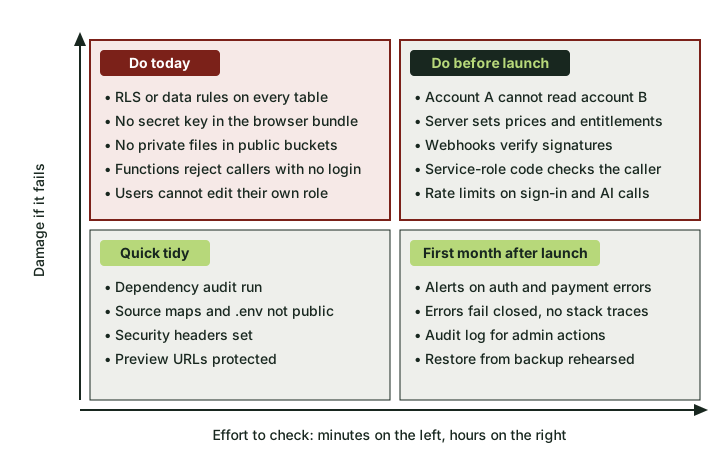 Start top left. Those five checks take minutes and cover the worst outcomes.
What a vibe-coded app is made of
Almost every app these tools produce has the same skeleton: a browser bundle, server code (edge functions, API routes, server actions), a database with file storage, sign-in, npm packages and hosting configuration. Tools differ mostly in where the access rules live and whether the browser talks to the database directly.
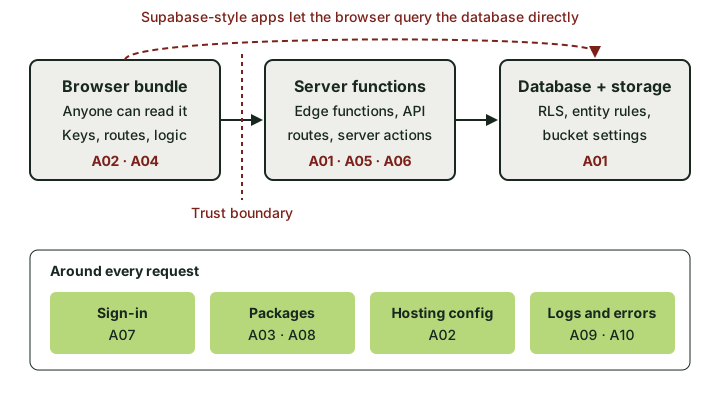 If the browser can reach the database directly, the database rules are the only thing standing between users.
In a Supabase-backed app the browser holds a publishable key and queries tables directly, so the database rules are your access control. In a Replit Express app or a Next.js app with server-only database access, the rules live in your server code. Same question, different place to look.
The database (A01 Broken Access Control)
1. Does every table have row-level security (or the tool's equivalent) switched on? For Supabase-backed apps, including Lovable's built-in backend and Bolt's database, run this in the SQL editor:
select tablename, rowsecurity
from pg_tables
where schemaname = 'public'
order by rowsecurity, tablename;
Any false near the top is a "no". For Base44, open Dashboard, then Data, then each table's Permissions panel.
2. Does every policy say who owns the row, rather than just "someone is signed in"?
select tablename, policyname, cmd, roles, qual, with_check
from pg_policies
where schemaname = 'public'
order by tablename, cmd;
Look for qual equal to true, or a condition that only checks auth.uid() is not null. Both mean any signed-in user (or anyone, if roles includes anon or public) gets every row. Our piece on Supabase RLS mistakes walks through the patterns that look fine and are not.
3. Do insert and update policies have a with_check that pins ownership to the caller?
An empty with_check on an update policy can let a user move a row into someone else's account.
4. Can account A read account B's data when you ask the API directly? This is the one that proves the others. Sign up two test accounts, copy A's access token from the browser's network tab, and request B's rows:
curl "https://YOUR-PROJECT.supabase.co/rest/v1/orders?user_id=eq.USER_B_ID&select=*" \
  -H "apikey: YOUR_PUBLISHABLE_KEY" \
  -H "Authorization: Bearer USER_A_ACCESS_TOKEN"
Good looks like []. Bad looks like B's orders. Repeat without the Authorization header to test anonymous access. Use test accounts only; never point this at real customer data.
5. Are there views or security definer functions that sidestep your policies?
Plain views run with the owner's rights unless created with security_invoker = true (Postgres 15 and later), and a security definer function in the public schema can be called over RPC by anyone allowed to execute it. The Supabase Security Advisor flags security definer views (lint 0010_security_definer_view) but not every risky function, so list the functions yourself:
select p.proname
from pg_proc p join pg_namespace n on n.oid = p.pronamespace
where n.nspname = 'public' and p.prosecdef;
Each one needs its own check on who is calling.
6. Can users change their own role?
If is_admin or role sits on a profiles table with an update policy of "users can update their own profile", a user can promote themselves. Test it with a PATCH request from a normal account.
File storage (A01)
7. Are private files in private buckets?
select id, public from storage.buckets;
A bucket marked public serves every file to anyone with the URL, whatever your storage policies say. Avatars can be public. Invoices, ID documents and uploads should not be.
The browser bundle (A02 Security Misconfiguration, A04 Cryptographic Failures)
8. Is the browser bundle free of secret keys?
Build the app and search the output. Vite apps (older Lovable apps, and the many Bolt projects that use Vite) write to dist, Next.js to .next/static; for anything else, check where your build puts browser files:
grep -rEo "sb_secret_[A-Za-z0-9_]+|sk_live_[A-Za-z0-9]+|rk_live_[A-Za-z0-9]+|-----BEGIN [A-Z ]*PRIVATE KEY" dist .next/static 2>/dev/null
Legacy Supabase service_role keys are JWTs, so the word "service_role" is base64-encoded and grep will not find it. List the tokens, then decode the middle part of each locally:
grep -rhoE 'eyJ[A-Za-z0-9_-]+\.eyJ[A-Za-z0-9_-]+\.[A-Za-z0-9_-]+' dist .next/static 2>/dev/null | sort -u
node -e 'console.log(Buffer.from(process.argv[1].split(".")[1], "base64url").toString())' "PASTE_TOKEN"
"role":"anon" is expected. "role":"service_role" is an incident: rotate it before you do anything else. Our article on secrets that reached the browser covers rotation and clean-up.
9. Do only intentionally public values carry the public prefix?
In Next.js, anything prefixed NEXT_PUBLIC_ is inlined into client JavaScript at build time (Next.js environment variable docs); in Vite the prefix is VITE_. A NEXT_PUBLIC_SUPABASE_SECRET_KEY is a "no" however the code uses it.
10. Are source maps and stray files unreachable on the live site?
Request /.env, /.git/config and one of your .js.map files. You want 404s (or source maps you have deliberately chosen to publish).
Server code (A01, A05 Injection, A06 Insecure Design)
11. Does every edge function, API route and server action reject a caller with no session?
Call each one with curl and no Authorization header. Anything that does work and returns 200 is a "no", unless it is meant to be public (a contact form, a webhook). In Supabase projects, look for verify_jwt = false in supabase/config.toml and confirm those functions authenticate the caller themselves. In Next.js, server actions are reachable POST endpoints, so check the session inside each one, not only in middleware.
12. Does code that uses a secret or service-role key check who is asking before it queries?
That key bypasses RLS (Base44's asServiceRole bypasses both its row and field rules, per its docs). The function must do its own ownership check, or it becomes a public door into every table.
13. Does the server decide prices, quantities and entitlements?
If the browser sends amount: 49 and the server trusts it, a user can send amount: 1. Fulfil only after a verified provider event. Our Stripe webhook guide shows the signature check (A08 Software or Data Integrity Failures).
14. Is user input kept out of raw SQL, shell commands and system prompts?
Search for template strings inside sql, query( or exec( calls. For AI features, check that a user's message cannot rewrite the instructions that control what data the model can fetch.
15. Are expensive or abusable endpoints rate-limited? Sign-in, password reset, email sending and anything that calls a paid AI API. One script in a loop should not be able to run up your bill.
Sign-in (A07 Authentication Failures)
16. Are email confirmation and leaked-password protection on, and do reset links expire? Check your provider's auth settings. Use a reset link twice; the second use should fail.
17. Does sign-out actually end the session? Sign out, then replay an earlier API request with the old token. Supabase access tokens are JWTs that stay valid until they expire, so keep expiry short rather than expecting instant revocation.
Packages, hosting and logs (A03, A02, A09, A10)
18. Have you run npm audit --omit=dev and decided on every high or critical finding? Confirm each package the AI added is the one you meant, spelled exactly (A03 Software Supply Chain Failures).
19. Is your framework patched? Check with npm ls next. CVE-2025-29927 let a crafted header skip Next.js middleware entirely, so any authorisation check living only in middleware could be bypassed. It affected 11.1.4 onwards and was fixed in 15.2.3, 14.2.25, 13.5.9 and 12.3.5. Vercel-hosted deployments were protected automatically; self-hosted ones were not. The broader lesson stands whatever your version: check the session where the data is read, not only in middleware.
20. Are preview and staging URLs protected? On Vercel, open Settings, then Deployment Protection, and confirm it is at least Standard Protection (everything except production domains), which is available on every plan. Don't assume; team defaults can be changed. If preview and production share environment variables, a preview can be talking to the real database.
21. Do errors fail closed without stack traces, and does someone get an alert when sign-in or payments start failing? (A10 Mishandling of Exceptional Conditions, A09 Security Logging and Alerting Failures.)
Tool by tool: the usual backend and what to check first
Tools change quickly, so this reflects their documentation as of November 2026. Built-in scanners are useful, and every vendor says plainly that they do not replace a review.
| Tool | Usual backend | Built-in security help | Check first |
|---|---|---|---|
| Lovable | Built-in backend (Supabase underneath) or your own Supabase project; React and Vite, or TanStack Start for apps created from 13 May 2026 | Quick scan and Deep scan, covering RLS, dependencies, access control and secrets (Lovable docs) | Items 2, 4 and 11. A scan can confirm RLS exists; only your two-account test shows the policy is right. Full walkthrough in our Lovable app security audit |
| Bolt.new | Bolt Cloud database, whose Security tab runs the same checks as Supabase's Security Advisor, or a Supabase project | Database security check plus a whole-project security audit (Bolt docs) | Items 2, 3 and 13. Bolt documents that on a site without sign-in it may write policies letting any visitor read and change data, flagged as RLS Policy Always True. Read every one |
| Cursor or Claude Code | Whatever you chose. Often Next.js with Supabase, Postgres plus an ORM, or Firebase | Claude Code's /security-review command and Cursor's Bugbot review code changes |
Items 8, 9 and 12, plus git log -p -S "sk_live_" for secrets in history and a look at what the agent can read in .env |
| v0 on Vercel | Next.js App Router, often with a database such as Supabase or Neon added from the Vercel Marketplace | Per v0's security docs, warnings about NEXT_PUBLIC_ usage and a security review you can ask for before shipping; no documented automatic scan of your app |
Items 9, 11, 19 and 20. Marketplace integrations add env vars, so check which got a NEXT_PUBLIC_ prefix |
| Replit | Replit-managed PostgreSQL via DATABASE_URL, usually behind an Express or similar server; often Replit Auth |
Security Agent, which audits code, dependencies and privacy issues before you publish (Replit docs) | Items 4, 11 and 15. The server connects with full database rights and the browser never touches the database, so no RLS layer is filtering rows for you. Every route must filter by the signed-in user |
| Base44 | Base44's own backend with entities, built-in auth and backend functions | AI adds permission rules to new tables, a "Permission risks detected" banner, and a security scan (Base44 docs) | Items 1, 2 and 12. Read each entity's rules, and audit every asServiceRole call |
Treat "built-in help" as what the vendor documents, not what it guarantees. And if you moved tools (a Lovable export opened in Cursor is common), check the rules for both.
Prompts for your AI tool to review itself
Worth running, but the answer is a starting point, not proof. The model describes what it believes the code does, can miss a migration it did not write, and likes to report that all is well. Verify each answer with the matching query or request above.
- "List every table in the database with its RLS status and each policy in plain English: who can select, insert, update and delete which rows."
- "List every edge function, API route and server action. For each, say whether it requires a signed-in user, whether it checks the user owns the record, and which key it uses to reach the database."
- "Find every place a secret or service-role key is used, and show the authorisation check that runs before it."
- "List every environment variable and say whether it ends up in the browser bundle."
- "Where does the server decide a price, a plan or a credit balance? Show me the line. Is any of it taken from the request body?"
- "Which storage buckets exist, which are public, and what kind of files go in each?"
- "Write a test that signs in as user A and tries to read, update and delete user B's records. Run it and show me the output."
The last one is the keeper. It leaves you a test to rerun after every change.
What this won't catch
This catches the common, expensive mistakes. It will not find a subtle logic flaw in a multi-step workflow, a tenant leak in a complicated role model, or code paths you did not know existed. If you handle payments, health data or several organisations in one database, a second pair of eyes earns its keep. A launch review adds a read-only look at the code alongside the live site.
If you do nothing else, do the five in the "Do today" box, then item 4, this afternoon. They are the difference between "we had a bug" and "we had a breach".