 BYTEASSUREStart a review
If you are asking "is my Lovable app secure?", the honest answer is that Lovable can't tell you on its own, and neither can clicking around your app as yourself. A Lovable app security audit comes down to one question asked seven different ways: if a second, ordinary user ignores your interface and talks to the backend directly, what can they read, change or unlock? Below is where to look, and how to test each answer with two test accounts and curl.
It assumes you are testing your own project with test data. Don't point any of this at someone else's app.
How a Lovable app is put together
Lovable apps created before 13 May 2026 are React and Vite front ends that build to static files. Apps created from that date use TanStack Start, which runs server code (server-side rendering, server functions and API routes), according to Lovable's hosting documentation. Either way, the backend is normally Supabase underneath: Lovable's built-in backend (the default, which Lovable manages for you) or a Supabase project you connected yourself. The tables, policies, buckets and edge functions below work the same way in both; what differs is whether you inspect them in Lovable's More panel or the Supabase dashboard.
That gives you four places where security actually happens:
- The database API. The browser talks to Postgres through Supabase's REST API using a publishable key and the user's session token. Row-level security (RLS) policies are the only thing deciding which rows come back.
- Storage. Uploaded files sit in buckets, governed by a public or private flag and by policies on
storage.objects. - Functions. Edge functions in
supabase/functions/, plus server functions in newer TanStack Start apps. These hold your secrets and often use the service role, which bypasses RLS entirely. - Third parties. Stripe, email and AI providers, called from functions and sometimes calling back in via webhooks.
The React code is not on that list, and that's deliberate. Anything the browser enforces, a user can skip.
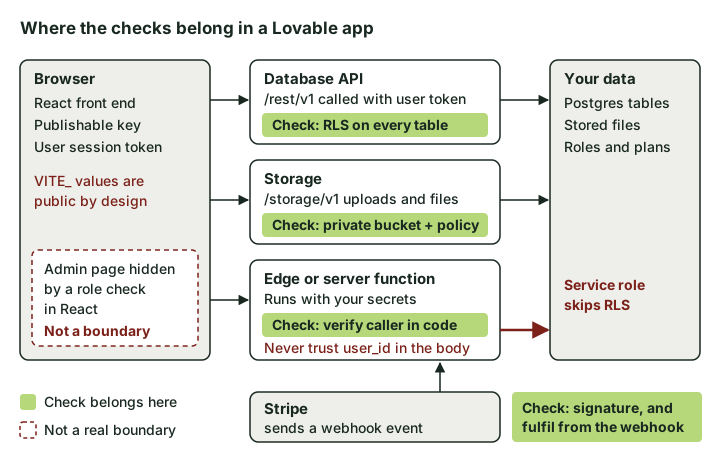 Each green box is a check that has to hold even when someone bypasses your interface. The red paths are where it usually fails.
What Lovable's own security scan covers
Run Lovable's built-in checks first. Per the security overview in Lovable's docs as of November 2026, they work like this:
| Quick scan | Deep scan | |
|---|---|---|
| When it runs | Automatically in the publish dialog, or from Run quick scan in the project's Security view | Only when you start it (Enterprise workspaces can schedule it) |
| What it checks | Tables without RLS, access rules that let everyone through, leaked-password protection, file storage rules, critical-severity dependency vulnerabilities, an MCP server check | Everything in the Quick scan, plus a review of your code for access control, unauthenticated endpoints, injection, leaked secrets, payments and billing, authentication and exposed personal data |
Critical findings block publishing only if a workspace admin or owner switches on Block publishing with critical issues (new Enterprise workspaces start with it on). A few other limits are worth knowing. Both scans review your code and configuration; nothing in the docs says they sign in as two different users and try to read each other's data. The dependency audit raises only critical-severity vulnerabilities as findings. Auto-fix works on Quick scan findings, not Deep scan ones. And Lovable says plainly that these tools "do not replace a thorough security review".
So run the Deep scan before you publish (it is free to run yourself), fix what it finds, then do the manual tests below. The scan tells you what looks wrong. The tests tell you what is.
Set up two test users first
Every step below uses the same trick, so set it up once. Create two accounts in your app: User A and User B. As User A, create a record of every kind your app supports (a project, an invoice, an uploaded file). Note their IDs.
Sign in as User B in a separate browser profile and copy B's session token from the developer console (the default Supabase client keeps it in local storage):
JSON.parse(localStorage.getItem(Object.keys(localStorage).find(k => k.endsWith('-auth-token')))).access_token
This assumes the standard client setup Lovable generates, which stores the session in local storage under a key like sb-<project-ref>-auth-token. If it returns an error, your app keeps the session somewhere else (cookies, for example); copy the token from the Authorization: Bearer header of any request in the Network tab instead.
Your project URL and publishable key are in the .env file Lovable commits (VITE_SUPABASE_URL and VITE_SUPABASE_PUBLISHABLE_KEY), or in the apikey header of the same requests. Now you can make requests as User B without the interface getting in the way:
curl "https://<ref>.supabase.co/rest/v1/projects?select=*" \
  -H "apikey: $PUBLISHABLE_KEY" \
  -H "Authorization: Bearer $TOKEN_B"
Drop the Authorization line to test as an anonymous visitor. Same request, different identity, compare what comes back.
Step 1. RLS on every table
This step matters most. Start with an inventory. Run this in a SQL editor (the Supabase dashboard for a connected project; Lovable's Database view also lets you run SQL on the built-in backend):
select c.relname as table_name, c.relrowsecurity as rls_on
from pg_class c join pg_namespace n on n.oid = c.relnamespace
where n.nspname = 'public' and c.relkind = 'r'
order by 2, 1;

select tablename, policyname, cmd, roles, qual, with_check
from pg_policies where schemaname = 'public';
On the built-in backend, Lovable also lists the policies, read-only, under More → Database → Manage → Policies. Expand each row to read its condition.
What bad looks like: rls_on false on any table, a qual of true on a table holding personal data, roles containing anon where nobody signed-out should be reading, or an UPDATE policy with no with_check. A policy of auth.uid() is not null means "anyone with an account", which for most tables is everyone.
Then test as User B, for every table: list everything, fetch A's record by ID, update it, delete it, and insert a row with A's user_id. A blocked read or update usually comes back as 200 with an empty array, not a 403. Empty is the pass. A blocked insert returns an error mentioning row-level security.
Policy design and the full test matrix are in our Supabase RLS audit guide.
Step 2. Storage buckets
List your buckets and whether they are public:
select id, public from storage.buckets;
A public bucket means anyone with a file's URL can download it, with no session at all. That's fine for product images and avatars. It's not fine for invoices, ID documents or anything a user uploaded expecting privacy, and filenames that look random are not access control.
For private buckets, the usual pattern is one folder per user, with policies that compare the first folder to the caller:
create policy "Users read own files" on storage.objects
for select to authenticated
using (bucket_id = 'documents'
  and (storage.foldername(name))[1] = (select auth.uid())::text);
Test it: as User B, request one of A's file paths via /storage/v1/object/authenticated/documents/<A-user-id>/<file> with B's token. Then try uploading into A's folder. Both should fail. Supabase's storage access control guide has the full policy reference.
Step 3. Auth settings
Three settings. For a connected Supabase project they live in the Supabase dashboard under Authentication. On the built-in backend they are under More → Users → Settings: the email options under Email, and Site URL and redirect URLs under Advanced.
Email confirmation. On the built-in backend this is the Auto-confirm email switch, and it should be off for a live app. If users are auto-confirmed, anyone can sign up as ceo@yourcustomer.com without owning that inbox. That's harmless in a to-do app and serious in one that grants team membership or trust based on email domain. Test it: sign up with an address you control and see whether the app lets you in before you click the link.
Redirect URLs. On the built-in backend Lovable maintains the Site URL and redirect list for the addresses it serves, so you mostly need to check that nothing extra has been added. On your own Supabase project they are yours to manage: the Site URL often still says http://localhost:3000, and the allow list tends to collect wildcards during development. Supabase's redirect URL guidance recommends exact URLs in production. Be especially wary of a wildcard on a shared domain such as https://*.lovable.app/**, which allows other people's published apps as destinations for sign-in and password-reset links.
Leaked-password protection. On the built-in backend it is the Password HIBP check under Email. The Quick scan flags it when it is off, so you may already have a finding.
Step 4. Edge functions that trust the client
Functions leak quietly, because they usually run with the service role and RLS no longer applies. Open each file in supabase/functions/ (and any TanStack Start server functions) and look for this shape:
const { userId, projectId } = await req.json();
const { data } = await supabaseAdmin.from('projects').select('*').eq('user_id', userId);
The function believes whatever user ID the browser sends. User B just sends A's ID.
The fix is to derive identity from the verified session token, never from the body. Supabase's guide to securing edge functions now uses a withSupabase wrapper from the @supabase/server package, which checks the caller and gives the handler the verified user's claims plus a client that respects RLS. It also warns that a handler querying a shared table through the admin client without filtering by the caller's ID returns every user's rows. Older generated functions won't use the wrapper; the principle is the same either way. Get the user from the verified JWT, and prefer a client created with the caller's token over the service role.
Also search supabase/config.toml for verify_jwt = false. That's expected for a Stripe webhook, which proves itself with its own signature. On a user-facing function it means the platform no longer checks the token before your code runs, so the function has to check the caller itself. (Supabase specifically warns against switching it off to make a development 401 go away.)
Test it: call each function as User B with A's IDs in the body, then again with no Authorization header. Functions that send email or call a paid AI API also need rate limits, even with correct auth.
Step 5. Secrets in VITE_ variables
Vite exposes variables prefixed VITE_ to client code, and whatever your code references ends up in the JavaScript it ships. Lovable's Secrets documentation says the same from the other side: VITE_ values are embedded in the client bundle at build time and must be safe to be public. It also tells you not to gitignore .env, because Lovable needs it committed for preview and published builds. So anything placed there is in Git as well as, if prefixed, the bundle.
In a healthy Lovable project, .env holds the Supabase URL, publishable key and project ID, and nothing else. Payment and AI provider keys belong in Secrets, which never reach the browser. The Secrets screen rejects VITE_ names, which helps, but a key pasted straight into code or .env by hand bypasses that.
Check the built output, not just the source:
npm run build
grep -rEo "sk_(live|test)_[A-Za-z0-9]{10,}|rk_live_[A-Za-z0-9]{10,}|sb_secret_[A-Za-z0-9_-]{10,}" dist/
(For a TanStack Start app, point the grep at whatever output folder your build creates.) Legacy Supabase keys are JWTs beginning eyJ; decode the middle segment of any you find, and if it says "role":"service_role" you have an incident, not a finding. Rotate first, then clean up, as described in our guide to API keys in the front end.
Step 6. Admin pages gated only in the UI
A generated admin area often looks like if (profile.role === 'admin') return <AdminDashboard />. That hides a page. It doesn't protect any data, because the dashboard's queries go to the same database API User B can call directly.
Two tests. First, as User B, make the admin dashboard's queries yourself (open the Network tab as an admin to see them) and check they return nothing. Second, try promoting yourself:
curl -X PATCH "https://<ref>.supabase.co/rest/v1/profiles?id=eq.<B-user-id>" \
  -H "apikey: $PUBLISHABLE_KEY" -H "Authorization: Bearer $TOKEN_B" \
  -H "Content-Type: application/json" -H "Prefer: return=representation" \
  -d '{"role":"admin"}'
If the response shows "role":"admin", any user can make themselves an admin. This is common, because "users can update their own profile" is a reasonable-sounding policy that covers every column. Keep roles in a separate table that users cannot write to, check them in RLS policies and in functions, and don't let users update columns like role, plan or credits on their own rows.
Step 7. Stripe
Lovable can wire up payments through its built-in option or your own Stripe account, and builds the flow with edge functions. Either way, test the outcome rather than trusting the setup; Lovable's docs don't spell out which of these checks it handles for you. Use Stripe test mode and test keys for all of this.
- Price comes from the server. The checkout function should look up a price ID it trusts, not accept an amount or price from the request body. Test by calling it with a tampered amount.
- The success page grants nothing. Visiting
/success?session_id=anythingmust not unlock a plan. Access should change only when the webhook confirms payment. - The webhook checks its signature. Look for
constructEventAsyncwith your webhook signing secret (edge functions run on Deno, where the synchronousconstructEventfails because the crypto is async). Without it, anyone can post a fake "payment succeeded" event. See Stripe's signature documentation. - Users can't write their own plan. Rerun the Step 6 PATCH with
{"plan":"pro"}or whatever your column is called.
Our Stripe webhook verification article goes deeper on idempotency and replayed events.
False alarms worth knowing
The publishable key (or legacy anon key) in your bundle is meant to be public; it's only as strong as your RLS. A 200 with [] on a blocked update is a pass, not a failure. A Quick scan finding about a public bucket is fine if that bucket only holds marketing images (ignore it with a recorded reason, which the Security view lets you do). And a Supabase project URL in the page source tells an attacker nothing they couldn't get from any request your app makes.
The reverse also happens: a clean Quick scan says nothing about whether your policies express the right business rule. "Members can see projects in their organisation" can be implemented correctly against the wrong membership table, and only the two-user test shows it. If you are still deciding whether to pay for outside help at all, what a vibe coding security audit checks covers what scanners miss and how to compare quotes.
When to hire someone to secure your Lovable app
If every cross-account request in the seven steps came back empty or refused, you're in decent shape. Bring in outside help when the stakes rise: payments beyond a simple checkout, health or financial data, organisations with several roles, or simply not having the time to do the steps above properly. That's what our launch review is for. It looks at the live app and reads the code read-only, so you get findings tied to specific tables and functions, and one recheck after you fix the most important one.
Whichever route you take, rerun the Deep scan and the User B tests after every significant prompt that touches the database or auth. Lovable rewrites code quickly, and a policy that was right on Tuesday can be regenerated by Thursday.