 BYTEASSUREStart a review
A vibe coding security audit is worth paying for when your app has sign-in, stores other people's data or takes money. If it is a static landing page with a waitlist form, it probably is not. The audit's job is to answer one question the AI tool that built your app cannot answer about itself: can a stranger, or one of your own users, read or change something they should not?
That question lives in four places in a typical Lovable, Bolt, Replit or Cursor build. Most of this article is about what a credible auditor checks in each, which parts a scanner can do for you, what you can check yourself this afternoon, and how to read a quote without being dazzled by the page count.
What a vibe coded app security audit actually checks
Generated apps tend to share a shape. A React or Next.js front end, a hosted database (very often Supabase, sometimes Firebase), a handful of edge or serverless functions, and a few third parties such as Stripe, an email provider and an AI API. The checks map onto those layers.
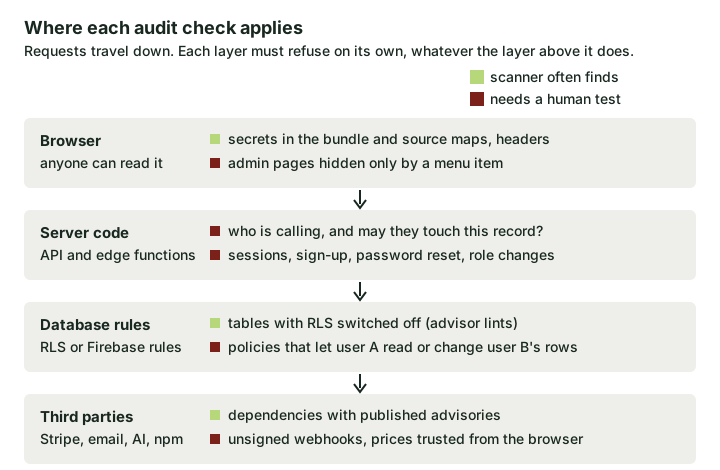 Each layer has to refuse bad requests on its own. Green checks are often caught by tools; red ones need someone to try the request as the wrong user.
Data access and RLS. If the browser talks to Supabase directly, row-level security is the only thing between one customer and another's rows. Supabase's own docs are clear that the publishable (or legacy anon) key is meant to be public and that RLS is what protects the data. The audit reads every policy and then tests it with two real accounts. "RLS enabled" with a policy of using (true) is a common, quiet failure. We cover the policy mistakes in more depth in Supabase RLS mistakes that look safe.
Authentication and sessions. Can someone sign up with an unverified email and land in another organisation? Does password reset leak whether an account exists, or worse, accept a token twice? Is the user's role stored somewhere they can edit, such as a profiles.role column with an update policy that lets users change their own row?
Secrets in the bundle. Anything your front end needs at runtime ships to the browser. Vite exposes variables prefixed VITE_ to client code (Vite env docs), and Next.js inlines anything prefixed NEXT_PUBLIC_ into the JavaScript it sends to the browser at build time (Next.js env docs). The prefix is a publishing decision, not a hiding place. The audit looks for keys that grant privilege, a Supabase secret or service_role key, a Stripe secret key, an OpenAI key, rather than flagging every public identifier as a disaster.
Server endpoints and edge functions. Each one should establish who is calling and whether that caller may touch the specific record named in the request. Generated functions often check the first and skip the second, or create a Supabase client with the secret key (which bypasses RLS) and then query by whatever ID the request supplied.
Payments and webhooks. The order must be marked paid by a verified Stripe webhook, not by the browser landing on a /success page. The price must come from your server or Stripe, not from a hidden form field. There is a full walk-through in verifying Stripe webhooks.
Admin routes hidden only in the UI. A surprisingly common pattern: the admin link only renders when user.isAdmin is true, but the /admin route and the functions behind it never check again. Hiding a button is a design choice, not access control.
Dependencies. Known-vulnerable packages, abandoned packages, and (now and then) a package name the AI invented that somebody has since registered. Dull, but cheap to check.
If you want the general framing behind these, OWASP's broken access control category sits at the top of its Top 10 for good reason, and most of the list above is a variation on it.
What automated scanners catch, and what needs a human
Scanners are good at things that look the same in every app. They are poor at anything that depends on what your app is supposed to allow, because they do not know.
| Check | A scanner or linter usually finds it | Needs a person who understands the app |
|---|---|---|
Missing security headers, exposed .env or .git files |
Yes | |
| Recognisable secret patterns in the bundle or repo | Yes, with false alarms | Deciding whether the key is privileged |
| Tables with RLS switched off | Yes, Supabase's Security Advisor flags this | |
| A policy that is enabled but too broad | Rarely | Yes, by testing as two users |
| Edge function trusting an ID from the request | No | Yes |
| Admin API callable by a normal user | No | Yes |
| Payment marked paid without a verified event | No | Yes |
| Vulnerable dependency versions | Yes | Judging whether the vulnerable code is reachable |
So a scan is a fine first pass and a poor final word. If somebody offers you an "audit" that is a scanner report with a logo on it, the right-hand column is what you did not get.
What you can check yourself in an afternoon
None of this needs a security background. It needs two test accounts, the browser dev tools and a bit of patience. Do it on a staging copy if you have one.
1. Search your built bundle for privileged keys. Build the app locally and grep the output folder:
npm run build
grep -rEo "sb_secret_[A-Za-z0-9_-]+|(sk|rk)_live_[A-Za-z0-9]+|sk-(proj|ant|svcacct)-[A-Za-z0-9_-]{20,}|sk-[A-Za-z0-9]{40,}" dist/ .next/static/ 2>/dev/null
Vite projects build to dist/; Next.js puts browser code in .next/static/. The pattern looks for Supabase secret keys, Stripe secret and restricted keys, and OpenAI- or Anthropic-style keys. (A looser sk- pattern also matches minified code and long class names that happen to contain sk-, such as mask-... or task-..., which is why this one insists on a known prefix or a long unbroken run.) Treat a hit as a lead to confirm, not a verdict.
Legacy Supabase keys are JWTs, so the word service_role will not appear in plain text. List the tokens and decode the middle section on your own machine rather than pasting a possible secret into a website:
grep -rhoE 'eyJ[A-Za-z0-9_-]+\.eyJ[A-Za-z0-9_-]+\.[A-Za-z0-9_-]+' dist/ .next/static/ 2>/dev/null | sort -u
node -e 'console.log(Buffer.from(process.argv[1].split(".")[1], "base64url").toString())' "PASTE_TOKEN"
"role":"anon" is fine. "role":"service_role" means rotate the key today, then read what to do when a service role key is exposed.
2. Look for tables without RLS. In the Supabase SQL editor:
select tablename, rowsecurity
from pg_tables
where schemaname = 'public'
order by rowsecurity, tablename;
Anything showing false is readable and writable by anyone holding your public key, subject to grants. Then read every policy as a sentence. A condition of true, or one that only checks auth.uid() is not null, means "any signed-in user", which is sometimes intended (a public product catalogue) and usually is not. The vibe coding security checklist has the policy query and the other database checks if you want to go further.
3. Try to read another user's data. Sign in as user A, open the Network tab, find a request that loads A's records and copy it as cURL. Sign in as user B in a private window, take B's access token and replay A's request with B's token. Then change the ID in the URL or body to one of A's records. If B gets A's data back, you have found the most common serious bug in generated apps.
4. Visit admin pages directly. As a normal user, type /admin, /dashboard/admin or whatever your app uses straight into the address bar. Then call the admin functions themselves from the console or with cURL. The page refusing to render is not enough; the function must refuse too.
5. Try to pay less. Do this on staging with Stripe in test mode and test keys, never against live payments. Start a checkout, abandon it, then visit your success URL directly without paying. Does anything get unlocked? Change the amount or price ID in the request your app sends. Does the server accept it?
6. Run the cheap tools. npm audit --omit=dev lists known advisories for your production dependencies. Gitleaks scans your Git history for committed secrets with gitleaks git . (older versions used gitleaks detect). Expect noise from both. A high-severity advisory in a build-only tool is usually less urgent than it looks.
If all six come back clean, you have not proven the app is secure, but you have removed the embarrassing failures and an auditor's time will go further.
Common false alarms while you do this: the Supabase publishable or anon key in the bundle (expected), a Stripe pk_live_ key (publishable by design), a Firebase config object (identifiers, not credentials) and Google Maps keys that are restricted to your domain.
How to scope and compare quotes for an AI generated code security review
Quotes for "a security audit" can differ by an order of magnitude and still both be honest, because they describe different work. Before comparing price, line them up on what each one will actually do. A credible proposal states, in writing:
- Targets. The exact URLs, environments and repositories in scope, and what is excluded (third-party platforms, denial-of-service, social engineering).
- Access. Whether they review the code or only the live site, and whether they will test with real accounts in each role you have. Without code or accounts, they cannot assess most of the red checks in the diagram above.
- Method for access control. Whether they test policies and endpoints as one user against another user's data. If the proposal does not mention cross-account or cross-tenant testing, assume it is not included.
- Authorisation. A written confirmation that you own or control the targets and permit testing. A reputable reviewer will insist on this before touching anything live.
- Deliverable. Findings ranked by impact, each with steps to reproduce, the affected file or endpoint, and a fix. Ask to see a sample report; vague findings like "consider improving access control" are a warning sign.
- Retest. Whether one recheck of fixes is included, and within what window.
- Who does the work. A named person or team, and whether the work is manual, tool-driven or both.
If you are still unsure which level of review fits your app, choosing a security review walks through the options so we do not have to repeat it here.
Vibe coding security audit cost
Published prices vary widely, and the sourced comparison is in what a vibe coding security audit costs. In short, the offers tend to be structured like this:
- Automated scans and self-serve tools are the cheapest tier, often subscription-priced. Useful for the green checks, blind to most of the red ones.
- Fixed-price reviews for small apps have appeared specifically for AI-built products. They usually combine a live check with some code reading and a short, prioritised fix list. Prices vary with whether code review and retesting are included.
- Manual reviews of complex apps (payments, sensitive data, several roles or tenants) cost more because they take longer, and the time goes into exactly the cross-account testing that matters.
- Penetration tests from established firms are typically quoted per engagement based on estimated tester-days, which is why the same app can attract very different quotes from a boutique and a large consultancy.
For a concrete reference point, our own published prices run from a £149 passive snapshot (public-facing only, it does not test database rules) through the £449 5-Day Two-Account Check, which adds two test users and read-only code review, to £2,249 for a deeper manual review that tests RLS against real roles. Other providers will price differently. The useful comparison is not cost alone but cost per red check covered.
Two rules of thumb. A quote that does not mention test accounts or code access is almost certainly a scan, whatever it is called. And the cheapest useful option is the one that tests whether one user can reach another user's data; anything that skips that is cheap for a reason.
When a vibe coding security audit is worth paying for
If the app is a prototype with no real users, do the afternoon checks and move on. If it has sign-in and real customer data, or it takes payments, the access control questions above are the ones that end up in a breach notice, and they are hard to answer from the inside because the same tool that wrote the code tends to reassure you about it.
The OWASP Application Security Verification Standard is a good yardstick if you want to know what "thorough" looks like at the far end. Most early products do not need all of it. They need the handful of boundaries that would hurt most to get wrong, tested by someone who will try the request as the wrong user.