 BYTEASSUREStart a review
If your Supabase service role key was exposed (in a browser bundle, a public GitHub repo, a pasted log), treat it as a full database credential in somebody else's hands. Retire it within the hour, ship a replacement only to server code, then work out what could have been read or changed while it was public. Deleting the line from your code does nothing on its own.
The general principles are in If a secret reached the browser, deleting it is not enough. This is the Supabase-specific version: the keys, buttons and logs you will actually be staring at.
Why a leaked service_role key is worse than it sounds
Supabase's security model for browser apps rests on one idea: the browser holds a low-privilege key, and row level security in Postgres decides what each request may touch. The service role key removes that second half. Supabase's own API keys guide says secret keys map to the service_role Postgres role, which has the BYPASSRLS attribute. Every policy you wrote is skipped. Not weakened. Skipped.
With that key, anyone can:
- read and write every table in the schemas your API exposes (usually
public, plus anything you added in the API settings); - list, download, overwrite and delete objects in every storage bucket, private ones included;
- call the Auth admin API, which lists users with emails and phone numbers, creates users, changes passwords and edits
app_metadata; - call any database function exposed through the API.
The Auth admin access matters later. If your policies or code trust a role stored in app_metadata, an attacker can make themselves an admin, and that survives rotation. Rotation stops new requests. It does not undo old ones.
What the key does not give: your database password, the Management API, or arbitrary SQL. Unless somebody (or an AI tool) exposed an exec_sql style function through the API, in which case it does. Check for one.
Confirm the service role key was exposed, and where
Five minutes, no more. You need two facts: which kind of key it is, and where it has been.
Which key. An sb_secret_... key is the incident; an sb_publishable_... key is meant to be public. (The full key table, and what a public key can reach, is in our outside-in Supabase security scan.) The legacy keys are harder, because anon and service_role are both long JWTs starting eyJ and look identical at a glance. Decode the middle segment locally (never in an online JWT decoder, which would be leaking it a second time):
node -e "console.log(Buffer.from(process.argv[1].split('.')[1], 'base64url').toString())" "$SUSPECT_KEY"
"role":"anon" is the public key and probably not an incident (though do check your RLS is actually doing its job). "role":"service_role" is the incident.
One wrinkle: Supabase rejects an sb_secret_ key sent from a browser with a 401. So a secret key in your bundle probably broke your app rather than working. That protects nobody once the key has been copied: the check is on the User-Agent header, and curl does not claim to be Chrome.
Where it has been. Check three places, because each one has a different exposure window.
First, the deployed bundle and its source maps. Build locally the way production does, then grep the output. The patterns below print only the start of each match, so the key is not splashed across your terminal again:
grep -rEo 'sb_secret_[A-Za-z0-9_-]{8}|eyJ[A-Za-z0-9_-]{20,}\.[A-Za-z0-9_-]{20,}' dist/ build/ .next/static/ 2>/dev/null
Second, every commit on every branch, including files you have since deleted. These list the commits only, not the key:
git log --all -S 'sb_secret_' --format='%h %ad %an %s' --date=iso
git log --all -G 'service_role|SERVICE_ROLE' --format='%h %ad %an %s' --date=iso
Third, old deployments. Preview and previous production URLs on Vercel, Netlify and similar hosts often stay reachable, so fetch their JavaScript and grep that too.
The usual culprit is an environment variable with the wrong prefix. Vite inlines anything starting VITE_ into the client bundle, and Next.js does the same with NEXT_PUBLIC_ (how each build tool decides, and how to search a bundle properly, is in finding an API key in frontend code). A variable called VITE_SUPABASE_SERVICE_ROLE_KEY is public by definition, whatever the name suggests.
Write down the earliest timestamp you find (first commit, first deploy, first log line). That is the start of your exposure window, and the first day hangs off it.
Rotation in current Supabase, and what each option breaks
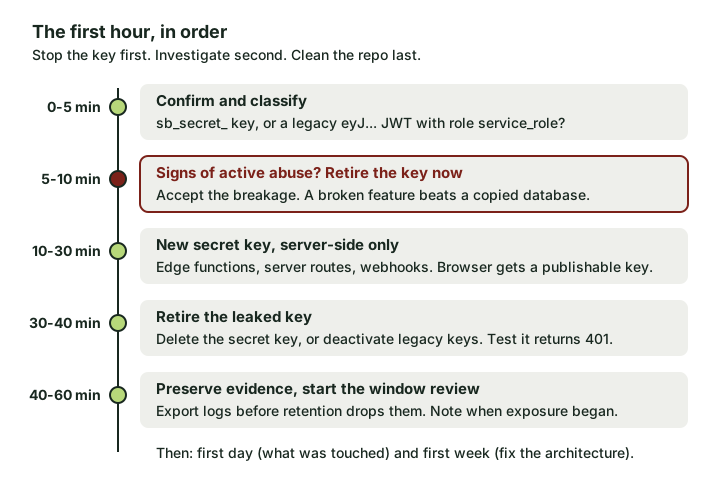 The first hour. Stopping the key comes before the investigation, and both come before tidying Git.
Older blog posts tell you to click "generate a new JWT secret". Supabase's troubleshooting note now says it is no longer possible to rotate the legacy anon, service and JWT secrets that way, and the old method signed everyone out and caused downtime anyway. The current route is in Supabase's guide to rotating a leaked or compromised API key. The shape is create, swap, retire, but which retire step you take depends on the key.
| Action | What stops working | Effect on live users | Reversible? |
|---|---|---|---|
Delete a leaked sb_secret_ key |
That key only. Other secret keys and all publishable keys keep working | None, if your server code is already on the new key | No. Deletion is permanent |
Deactivate legacy keys (for a leaked service_role) |
Both legacy keys, anon and service_role, together |
Any browser or mobile client still sending the legacy anon key breaks until it ships a publishable key |
Yes, but re-enabling brings the leaked key back to life |
| Move to JWT signing keys and revoke the legacy JWT secret | Anything still trusting JWTs signed with the old secret | None if you rotate first and wait past your access token expiry before revoking | Revocation is the final step, so do it deliberately |
The legacy case is the awkward one. Retiring a leaked service_role key deactivates anon as well, so if your frontend still uses the legacy anon key, the fix for the leak takes your app down. Two ways through this:
- No sign of abuse. Create a publishable key and a secret key, ship each to where it belongs, confirm both deployments are live, then deactivate the legacy keys.
- Signs of active abuse (unexplained writes, a strange IP hammering
/rest/v1/, users you did not create). Deactivate now and take the outage. Supabase's guide says the same thing: if the key is being used, retire it immediately even though components will break.
For a leaked legacy service_role key there is one more step. That key is a JWT signed with your project's legacy JWT secret, so anything that still trusts that secret could still accept it. The JWT signing keys guide walks through migrating: import the legacy secret, rotate to the new standby key, then revoke the legacy secret once your longest access token has expired (the docs suggest at least an hour and fifteen minutes on the default one-hour expiry). Done in that order, nobody gets signed out. Deactivate the legacy API keys before revoking the secret. This is day-one work, because deactivating the keys already shuts the main door.
Two practical details from the rotation guide that catch people:
- Edge functions using
withSupabase({ auth: 'secret' })accept only the key nameddefault. If your new key has a different name, change it toauth: 'secret:your_key_name'. - Database webhooks and
pg_netcalls that send the legacy key asAuthorization: Bearershould send the new secret key in theapikeyheader instead.
Then verify. Send a request with the old key and expect a 401:
curl -s -o /dev/null -w '%{http_code}\n' \
  "https://$PROJECT_REF.supabase.co/rest/v1/" -H "apikey: $OLD_KEY"
A 200 means it is still alive. Keep going until it isn't.
What to look for in Supabase logs
First, export the logs covering your window. Retention depends on your plan and can be short, so download what the Logs Explorer gives you now.
Supabase log queries now run against a single logs table: you pick a service with source and read fields from a log_attributes map, with every value stored as a string. Run the key-discovery query from the log filtering docs first, with source = 'edge_logs', to confirm which keys your project has. Then something like this lists write requests through the API gateway by IP (the Explorer's time-range picker also bounds the query, so widen it to cover your window):
select timestamp,
  log_attributes['request.method'] as method,
  log_attributes['request.path'] as path,
  log_attributes['request.headers.cf_connecting_ip'] as ip,
  log_attributes['response.status_code'] as status
from logs
where source = 'edge_logs'
  and timestamp > now() - interval 7 day
  and log_attributes['request.method'] in ('POST', 'PATCH', 'PUT', 'DELETE')
order by timestamp desc
limit 500;
The field names are the ones in Supabase's log field reference, linked from the same docs. One honest limit: the gateway logs do not give you a tidy "this request used the service role" column. You are looking for patterns instead.
- API gateway (
edge_logs). IPs that are not your users, your servers or your host's egress. Paths your frontend never calls. Paginated reads that walk an entire table. Anything under/auth/v1/admin/, which only privileged keys can use. Requests with an empty or unusualx_client_infoheader (supabase-js sets one, curl does not). - Auth (
auth_logs). Users created, deleted or modified in the window, particularly by admin actions rather than sign-ups. Checkauth_event.actionandremote_addr. - Storage (
storage_logs). List and download requests against private buckets, uploads or overwrites you cannot explain. The user agent is available here asreq.headers.user_agent. - Postgres (
postgres_logs). Errors from somebody probing functions or tables that don't exist are a classic sign of a person, not your app.
Then check the data itself, which outlives the logs:
-- users created or changed during the window
select id, email, created_at, updated_at, last_sign_in_at, raw_app_meta_data
from auth.users
where created_at > '2026-11-01' or updated_at > '2026-11-01'
order by updated_at desc;

-- storage objects added or replaced during the window
select bucket_id, name, owner_id, created_at, updated_at
from storage.objects
where updated_at > '2026-11-01'
order by updated_at desc;
Swap in your exposure start date. Look hard at raw_app_meta_data for roles you did not grant.
Common false alarms. Your own edge functions, cron jobs and seeding CI legitimately use the service key. Note their IPs and user agents first and filter them out, or you will spend an afternoon investigating yourself.
Which data to treat as read or changed
Be pessimistic here. Without clean evidence otherwise, assume:
- Read: every row in every API-exposed table, every object in every bucket, and the full user list with contact details. That is the scope for any notification decision. In the UK, a personal data breach is reportable to the ICO unless it is unlikely to result in a risk to people's rights and freedoms. If it is reportable, the ICO's breach guidance says to report it without undue delay and, where feasible, within 72 hours of becoming aware of it. Not every breach is reportable; record your reasoning either way.
- Possibly changed: anything with no audit trail. If your tables have
updated_atcolumns or a history table, use them. If they don't, compare against a backup or point-in-time restore taken before the window opened. - Possibly persistent: extra users, edited
app_metadata, replaced storage files (a swapped profile image is harmless, a swapped PDF invoice is not), and any rows that grant access, such as membership or invite tables.
If logs show nobody used the key, record which logs you checked and for which dates. "Nothing in the logs" from a project whose retention ended before the leak began is a different finding.
Move the privileged code where it belongs
The key leaked because a browser was doing something that needed privilege. Find out what. It is usually one of: an admin screen, a "create user" form, a bulk import, or a query that RLS blocked, which someone (or an AI assistant) "fixed" by swapping keys.
Each of these belongs in an edge function or a server route that:
- receives the user's session token from the browser and verifies it (Supabase's docs now point to
supabase.auth.getClaims()for this); - checks that this user may do this specific thing, because RLS no longer will on that path;
- reads the secret key from server-side configuration (in edge functions,
SUPABASE_SECRET_KEYS, a JSON dictionary per the Edge Function secrets docs); - does the one operation and returns only what the screen needs.
Step 2 is where rushed fixes go wrong. An edge function that runs whatever query the browser sends, with the secret key, has merely moved the leak somewhere less visible. Often the honest fix is no privileged code at all, just a correct RLS policy. Supabase RLS mistakes that look safe from the front end covers the policy side.
First hour, first day, first week checklist
First hour
- Classify the key (
sb_secret_or legacy JWT withrole: service_role) - Decide on active abuse. If yes, retire the key immediately
- Create a new secret key (and a publishable key, if the frontend still uses legacy
anon) - Deploy the new keys to server code and frontend respectively
- Delete the leaked secret key, or deactivate legacy keys
- Confirm the old key returns 401
- Export logs covering the exposure window
First day
- Fix the exposure window start from Git, deploy history and logs
- Review API, auth, storage and Postgres logs for the window
- Query
auth.usersandstorage.objectsfor changes in the window - For a legacy leak, migrate to JWT signing keys and revoke the legacy secret
- Decide what to treat as read or changed, and whether notification applies
- Remove old deployments and preview URLs that still serve the key
First week
- Move the privileged operation to an edge function or server route with its own authorisation check
- Rewrite Git history only if the repo is public and you understand the cost (the key is already retired, so this is hygiene, not containment)
- Add secret scanning in CI, for example Gitleaks, and enable GitHub secret scanning where available
- Add a build check that greps the production bundle for
sb_secret_andservice_role - Give each backend component its own named secret key, so the next leak means rotating one key, not all of them
- Ban
VITE_andNEXT_PUBLIC_prefixes on anything containingSECRETorSERVICEin a lint rule or pre-commit hook
Preventing the repeat
Of everything above, the bundle grep is the check that would have caught this, and it costs one line in CI. Commit scanners help, but the build is where a private-looking variable becomes public.
And finish the migration. Supabase is deprecating the legacy anon and service_role keys by the end of 2026. On publishable and secret keys, retiring a leaked key touches nothing else and logs nobody out, which turns the worst hour in this article into a fairly dull one.