 BYTEASSUREStart a review
A useful secret scan for a GitHub repo covers more than the files on your main branch. It needs every commit on every branch (a key deleted last month is still in history), the built output you actually deploy, and any Docker image you push. This guide gives you the exact commands for each, using GitHub's own scanning plus two free tools, Gitleaks and TruffleHog. Then it covers the part people skip: deciding which findings are real, and what to do about the ones that are.
If you already know a privileged key is out there, stop reading and rotate it. Everything below can wait half an hour; a live leaked key cannot.
What GitHub does for you, and what it costs
GitHub has two features worth separating.
Secret scanning looks for known credential formats across the whole Git history on all branches, plus issues, pull request descriptions, discussions and wikis. On public repositories it runs automatically and is free. When a supported token format turns up in a public repository, GitHub also reports it straight to the provider, which may revoke the key for you (that is the partner programme described in GitHub's secret scanning docs).
Push protection blocks a push that contains a recognised secret before it lands. There are two flavours. Push protection for users is on by default for your GitHub account and stops you pushing secrets to public repositories. Push protection for repositories is the one that protects a private repo, and it needs GitHub Secret Protection.
For private repositories, the position is:
| Repository | Secret scanning | Push protection |
|---|---|---|
| Public, any plan | Free, automatic | Free for your own pushes; repo-level setting available |
| Organisation private, GitHub Team or Enterprise Cloud | Needs GitHub Secret Protection (paid) | Needs GitHub Secret Protection |
| Personal private repo on a free or Pro account | Not available | Not available |
Secret Protection is licensed per active committer per month, where "active" means a commit pushed in the last 90 days. Check GitHub's plans page for the current price rather than trusting a figure in a blog post. Organisations on Team or Enterprise can also run a free one-off secret risk assessment from the organisation's security tab, which is a cheap way to see whether you have a problem before paying for anything.
So if your startup's code lives in a personal private repo, which is common for apps that began life in Lovable, Bolt or Cursor, GitHub is not scanning it. That is where the local tools earn their keep. They also find things GitHub's provider patterns don't, like a generic high-entropy string in a config.js.
Get a clone that really contains everything
A normal clone gives you the default branch and the remote branches, which is most of it. For a thorough first scan, use a mirror clone:
git clone --mirror https://github.com/your-org/your-app.git your-app.git
A mirror clone of a GitHub repository also fetches refs/pull/*, the heads of every pull request, including ones whose branches were later deleted. Secrets that were committed on a throwaway branch, pushed for a PR, then "cleaned up" tend to live there. (Those refs are read-only to you. GitHub's guide notes that a mirror push cannot rewrite them; only GitHub Support can.)
One more uncomfortable fact: commits you force-pushed away can still be reached on GitHub by their SHA in cached views and through those pull request refs, and forks keep their own copies. A clean history scan tells you what is in your refs today; it does not prove a value was never public. That is one reason rotation, not history rewriting, is the fix.
Gitleaks over the full history
Gitleaks is a single binary (brew install gitleaks on a Mac). Since v8.19 the commands are git, dir and stdin; the older detect and protect still work but are hidden.
# Every commit on every ref (the default runs git log --all --full-history)
gitleaks git --redact -v --report-path gitleaks.json your-app.git
--redact keeps the secret values out of your terminal scrollback, which matters if you are screen-sharing or pasting output into a ticket. The JSON report includes the commit, file, line, author and a Fingerprint for each finding.
To scan only a range, say since your last release tag, pass git log options:
gitleaks git -v --log-opts="v1.4.0..HEAD" .
If you are adopting it on an old repository with a lot of known, already-rotated noise, save a baseline and only look at new findings from then on:
gitleaks git --report-path baseline.json .
gitleaks git --baseline-path baseline.json --report-path new-findings.json .
TruffleHog, for checking which keys still work
TruffleHog overlaps with Gitleaks on detection, but its useful trick is verification: for hundreds of providers it tries the credential against the provider's API and labels it verified, unverified or unknown.
# A local clone (TruffleHog copies it to a temp directory before scanning)
trufflehog git file://. --results=verified,unknown

# A remote repo directly
trufflehog git https://github.com/your-org/your-app.git --results=verified,unknown
Start with verified,unknown, because those are the ones to act on today. Then run it again without --results (the default includes unverified) and read the rest. "Unknown" means TruffleHog tried to verify and hit an error, such as a network failure. "Unverified" means the pattern matched but TruffleHog could not confirm the key works: it may be expired, or the detector may have no verifier at all. Neither means safe.
A word of caution on verification: it sends the found credential to the provider. That is the point, and the provider already has it, but don't run verification against someone else's repository.
Scanning built output and Docker images
Source scanning misses the most common way a key reaches users: the build step copying an environment variable into JavaScript. Scan what you ship.
npm run build
gitleaks dir -v dist          # Vite and most SPAs
gitleaks dir -v .next/static  # Next.js client chunks
trufflehog filesystem dist --results=verified,unknown
The framework rules for which variables get inlined are in NEXT_PUBLIC_ vs secret key, and checking the live site for stray .env files and source maps is covered in Exposed .env file?.
For containers, every layer counts. A .env copied in one layer and deleted in the next is still in the image.
# Image in a registry
trufflehog docker --image your-org/your-app:latest --results=verified,unknown

# Image only on your machine
trufflehog docker --image docker://your-app:dev --results=verified,unknown

# Build arguments and ENV lines are visible in the history too
docker history --no-trunc your-app:dev
If docker history shows a key passed with --build-arg, treat it as leaked to anyone who can pull the image. Use build secrets (RUN --mount=type=secret) instead.
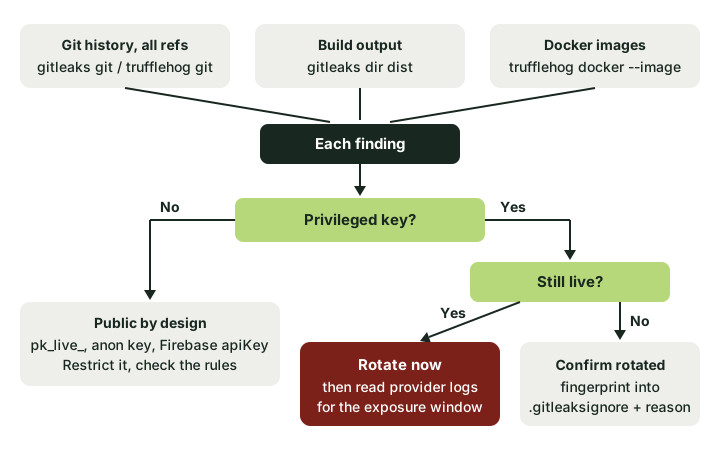 Three places to scan, one triage path. Rotation comes before any clean-up.
Triage: real leaks, public keys and noise
Expect a lot of findings on a first run. Most will not be emergencies. Go through each with three questions.
What kind of key is it? Some keys are designed to be public: a Stripe publishable key (pk_live_), a Supabase anon or publishable key, a Firebase web apiKey, a Sentry DSN. Finding those in a bundle is expected; the security lives elsewhere (RLS, rules, restrictions). A Stripe secret key (sk_live_), a Supabase service role or sb_secret_ key, an OpenAI key, an AWS access key (AKIA...) or a private key block is a real leak wherever it appears. The provider docs say which is which; when in doubt, treat it as private.
Is it still live? TruffleHog's verified answers this for supported providers. Otherwise, check the provider dashboard for that key's ID and last-used date. Don't test by pasting the key into random online checkers.
Where was it, and for how long? git log --all -S'first-8-chars-of-key' --oneline finds the commit that introduced it. If it was ever on a public repo, a public branch or in a shipped bundle, assume it was copied.
Common false positives, and how to quiet them properly:
- Test fixtures and documented example keys (
AKIAIOSFODNN7EXAMPLEis AWS's own example). Add#gitleaks:allowto that line, ortrufflehog:ignorefor TruffleHog. - Lockfile integrity hashes, base64 images and minified vendor code. Exclude the paths in a
.gitleaks.tomlallowlist rather than turning rules off. - A real key you have already rotated. Add its fingerprint from the report to
.gitleaksignoreso it stops shouting, and note the rotation date next to it.
Every allowlist entry should be something you would be happy to justify to a reviewer. "It was annoying" is not a reason.
When something real turns up
Rotate first. Revoke the old credential at the provider, issue a new one, and put the new one only in the server-side environment that needs it. Removing the key from the repository, or even rewriting history with git filter-repo, does nothing to the copies already made. GitHub's own guide to removing sensitive data puts it in the same order: revoke or rotate the secret first, then decide whether the clean-up is still needed.
Then look at the provider's logs for use you don't recognise during the exposure window, and work out what the key could reach. If a secret reached the browser covers that investigation in general, and if the key was a Supabase service role key, follow the first-hour runbook, because that key bypasses every RLS policy you have.
Rewriting history is optional and comes last. It is worth doing for very sensitive values or a repo about to go public, but it breaks every clone and open PR, so plan it.
Stop the next one with a pre-commit hook
The cheapest fix is catching the key before the commit exists. With the pre-commit framework, add .pre-commit-config.yaml at the repo root:
repos:
  - repo: https://github.com/gitleaks/gitleaks
    rev: v8.30.1
    hooks:
      - id: gitleaks
Then run pre-commit install once per clone, and pre-commit autoupdate now and then to move the version. The hook runs gitleaks git --pre-commit --redact --staged --verbose, so it only looks at what you are about to commit and is quick.
If you would rather not install pre-commit, a plain Git hook does the same job. Save this as .git/hooks/pre-commit and run chmod +x .git/hooks/pre-commit:
#!/bin/sh
gitleaks git --pre-commit --redact --staged --verbose
TruffleHog's equivalent, from its pre-commit documentation, which only fails on verified or unknown results (--trust-local-git-config skips its usual temporary clone, so use it only in your own repository):
#!/bin/sh
trufflehog git file://. --since-commit HEAD --results=verified,unknown --fail --trust-local-git-config
Two honest limits. Local hooks are opt-in: they live in each developer's clone (and in each AI coding agent's sandbox), and git commit --no-verify or SKIP=gitleaks skips them. So run the same scan in CI on every pull request as well, where it cannot be skipped, and turn on push protection wherever your plan allows it. And no pattern scanner catches a secret it has no pattern for, such as a password in plain English in a seed file. Scanning shrinks the problem; it doesn't make keys safe to commit.
A one-hour secret scan of your GitHub repo
Mirror-clone the repo. Run gitleaks git and trufflehog git ... --results=verified,unknown over it. Build the app and scan the output folder; scan your image if you have one. Rotate anything privileged and live, then anything privileged at all. Allowlist the genuine noise with reasons. Add the pre-commit hook and a CI job. If you want someone else to check the deployed bundle and the database rules behind your public keys, that is part of what our two-account check covers.