 BYTEASSUREStart a review
An API key in frontend code is not automatically a breach. Some keys are designed to sit in the browser, and Stripe, Supabase and Firebase all document that. Others (an OpenAI key, a Stripe secret key, a Supabase service_role key) give whoever reads them the same power your server has. The work is telling the two apart, and checking what your deployed app really ships.
This is the detection side: how keys get into the bundle, how to find them, how to classify them. If you already know a privileged key has leaked, skip to responding to a secret that reached the browser, or the Supabase service role key runbook if that is the key in question.
Why "it's in an environment variable" doesn't protect it
Every frontend build tool has the same deal. Variables with a particular prefix are copied into the JavaScript at build time, as plain strings. Everything else stays on the build machine. The prefix is the only thing deciding which side a value lands on.
| Tool | Prefix that ships to the browser | How it gets there |
|---|---|---|
| Vite (Bolt, older Lovable projects, and TanStack Start, which Lovable has used for new projects since May 2026) | VITE_ |
Statically replaced in import.meta.env at build time |
| Next.js | NEXT_PUBLIC_ |
Inlined into the client bundle at next build |
| Create React App (deprecated, still in older projects) | REACT_APP_ |
Embedded during the build |
| Expo | EXPO_PUBLIC_ |
Inlined into the compiled app bundle |
The Vite docs say in so many words that VITE_* variables should not contain sensitive information such as API keys, because their values end up in your source code. The Next.js docs describe the same inlining for NEXT_PUBLIC_. Expo's case is the bluntest of all, because the user has the whole compiled bundle on their device. (Unpacking an APK is an afternoon's hobby.)
Anything prefixed NEXT_PUBLIC_, VITE_, REACT_APP_ or EXPO_PUBLIC_ is public. The framework-by-framework detail, including server components and build-time inlining, is in which env vars reach the browser.
How keys end up there anyway
Three patterns explain most of these leaks, whether the code came from Cursor, Lovable, Bolt or a human in a hurry.
The "it said undefined" fix. In Next.js, a client component that reads process.env.OPENAI_API_KEY gets undefined, because unprefixed variables never reach the browser. The quickest way to make the error go away is to rename it NEXT_PUBLIC_OPENAI_API_KEY. It works. It also publishes the key. The same thing happens in Vite projects with VITE_.
The SDK opt-out. The official OpenAI and Anthropic JavaScript SDKs refuse to run in a browser unless you pass dangerouslyAllowBrowser: true. An AI assistant asked to "make the chat work" will happily add that flag. If it is in your code, you have found the problem.
The over-generous Vite config. Some generated vite.config.ts files load every variable and pass the whole lot to define:
// Don't do this. It can inline your entire environment into the bundle.
const env = loadEnv(mode, process.cwd(), "");
export default defineConfig({ define: { "process.env": env } });
The empty string as the third argument tells loadEnv to load every variable regardless of prefix, so the VITE_ safety rail is gone. If anything in the client then references process.env, the whole object can end up in the output.
How to find an API key in your own deployed app
Check the built output, not the repository. A build can pull a value from your host's environment settings that never appears in source, and a key in a server file may never reach the browser at all.
1. Search what the browser actually loaded
Open your live site in Chrome, open DevTools, and press Cmd+Option+F (Ctrl+Shift+F on Windows and Linux) to search across every loaded script. Try these one at a time:
sk_live,sk_test,rk_live(Stripe secret and restricted keys)sk-proj-,sk-ant-(OpenAI and Anthropic key prefixes)sb_secret_,service_role(Supabase)whsec_(webhook signing secrets used by Stripe and others)SG.andre_(SendGrid and Resend, noisy, see the false alarms below)dangerouslyAllowBrowser,apiKey,Authorization,Bearer
Code often loads lazily, so log in, click through the main screens, then search again.
2. Watch the Network tab
Filter the Network panel by Fetch/XHR and use the app normally. Look at the request headers. A request going straight from the browser to api.openai.com, api.anthropic.com, api.stripe.com or api.resend.com with an Authorization header means the browser holds that provider's key. For any of those four, that is the finding.
Requests to *.supabase.co carrying an apikey header are expected. What matters is which key it is, which we will get to.
3. Grep the build output
Run your production build locally and search the folder it produces (dist/ for Vite, .next/static/ for Next.js, build/ for Create React App):
grep -rEo "sk_(live|test)_[A-Za-z0-9]{10,}|rk_(live|test)_[A-Za-z0-9]{10,}|sk-(proj-|ant-)?[A-Za-z0-9_-]{20,}|sb_secret_[A-Za-z0-9_-]{10,}|whsec_[A-Za-z0-9]{10,}|SG\.[A-Za-z0-9_-]{16,}\.[A-Za-z0-9_-]{16,}|AIza[0-9A-Za-z_-]{35}" dist/ | sort -u
The AIza pattern catches Google API keys, usually fine but see the Firebase note below.
Older Supabase projects use JWTs for both the anon and service_role keys, and they look identical at a glance. Decode the middle section to see which role each one carries:
grep -rhoE "eyJ[A-Za-z0-9_-]+\.eyJ[A-Za-z0-9_-]+\.[A-Za-z0-9_-]+" dist/ | sort -u \
  | node -e 'for (const t of require("fs").readFileSync(0,"utf8").split("\n").filter(Boolean)) console.log(Buffer.from(t.split(".")[1], "base64url").toString())'
"role":"anon" is the public key. "role":"service_role" in a browser bundle is an incident.
4. Check for source maps
At the bottom of a production JavaScript file, look for a //# sourceMappingURL= comment, or simply request the file with .map appended. If the map loads, anyone can read your original source, comments and all. Vite (build.sourcemap) and Next.js (productionBrowserSourceMaps) both leave public source maps off by default, so if they are on, someone switched them on. Upload them to your error tracker privately instead.
view-source: on the page is worth a glance too, for config injected into the HTML in an inline <script>.
Common false alarms
Not every key-shaped string is a problem. These are public by design and turn up all the time:
- Stripe
pk_live_andpk_test_publishable keys - Supabase publishable keys (
sb_publishable_) and legacy anon JWTs - The Firebase
firebaseConfigobject, including itsAIza...apiKey - Sentry DSNs, PostHog project keys (
phc_) and similar analytics write-keys - Algolia search-only keys (the admin key is a different matter)
Generic patterns misfire too. re_ matches minified variable names, and high-entropy strings are often hashes or build IDs. Check a hit's prefix against the provider's docs before you lose a morning to it.
Which keys are public and which must stay server-side
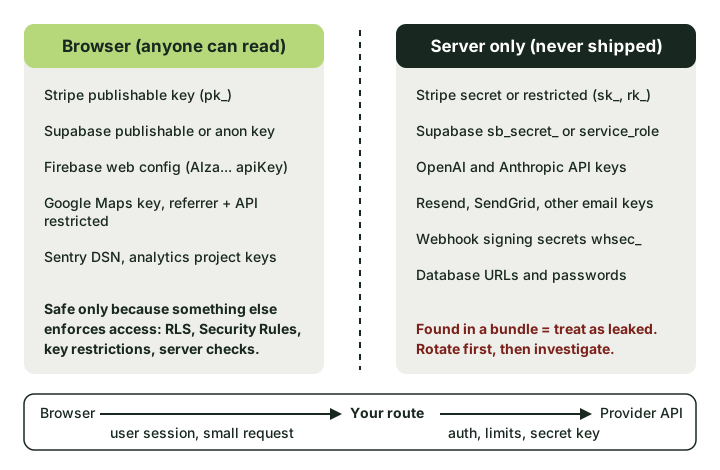 The browser may hold identifiers. Anything that grants authority on its own stays behind your server.
| Key | Looks like | Browser? | What makes it safe, or why not |
|---|---|---|---|
| Stripe publishable | pk_live_, pk_test_ |
Yes | Limited to client-side jobs such as collecting card details. Stripe says only publishable keys are safe outside your back end. |
| Stripe secret or restricted | sk_live_, rk_live_ |
Never | Full or scoped API access to your account. Restricted keys narrow the damage, they do not make it public. |
| Supabase publishable or anon | sb_publishable_, JWT with "role":"anon" |
Yes | Only reaches what Row Level Security allows. Safe exactly as far as your RLS policies are right. |
| Supabase secret or service_role | sb_secret_, JWT with "role":"service_role" |
Never | Bypasses RLS completely. |
| Firebase web config | AIza... in firebaseConfig |
Yes, with care | Identifies the project. Security Rules and App Check do the protecting. |
| Google Maps | AIza... |
Yes, if restricted | Restrict by HTTP referrer and to the Maps APIs you use, or someone else's traffic lands on your bill. |
| OpenAI, Anthropic | sk-proj-, sk-ant- |
Never | Direct spend on your account, plus access to any stored files or data the key can see. |
| Resend, SendGrid | re_, SG. |
Never | Sends email as your domain. Ideal for phishing that passes SPF and DKIM. |
| Webhook signing secret | whsec_ |
Never | Lets someone forge "payment succeeded" events to your webhook handler. |
Two details catch people out.
Supabase's newer sb_secret_ keys are rejected when Supabase sees a browser User-Agent, according to the Supabase API keys docs. That is a guard against accidents, not protection. An attacker who copies the key out of your bundle uses curl, and curl is not a browser.
The Firebase API key docs say Firebase keys are fine to include in code, then add an important exception: never allow the Gemini Developer API (the Generative Language API) on a key that is publicly accessible. Firebase web keys are ordinary Google Cloud API keys, so if Gemini is enabled on the project and the key is unrestricted, your "harmless" key can spend money on AI calls. In the Google Cloud console, open Credentials and check which APIs each browser key may call.
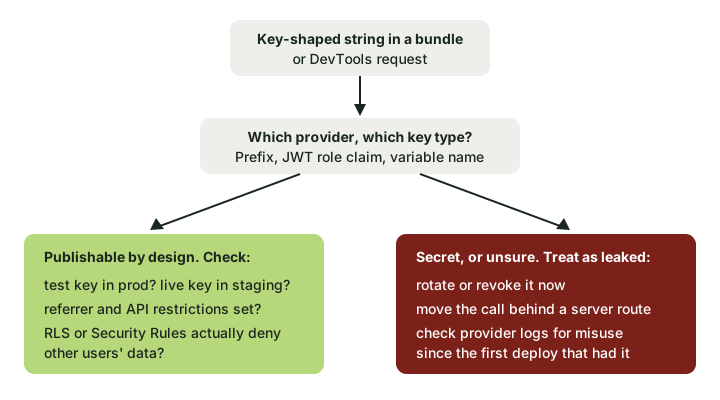 If you can't name the key type with confidence, assume the worse branch until you can.
A publishable key can still be a finding. A pk_test_ key in production means payments are not real. An unrestricted Maps key is a billing risk. A Supabase anon key is only as safe as the policies behind it, which is a separate check (see what a Supabase public key can reach from outside).
Fixing an API key in frontend code
The rule is no secrets in the client bundle, and the pattern is the same whatever the provider. The browser talks to your server, and your server checks who is asking before making the call with a key it keeps to itself.
In Next.js that is a route handler with an unprefixed variable:
// app/api/summarise/route.ts (runs on the server only)
import OpenAI from "openai";
import { getSessionUser } from "@/lib/auth"; // your own session check

const openai = new OpenAI({ apiKey: process.env.OPENAI_API_KEY }); // no NEXT_PUBLIC_

export async function POST(req: Request) {
  const user = await getSessionUser(req);
  if (!user) return new Response("Unauthorised", { status: 401 });

  const { text } = await req.json();
  if (typeof text !== "string" || text.length > 4000) {
    return new Response("Bad request", { status: 400 });
  }

  const result = await openai.responses.create({
    model: process.env.OPENAI_MODEL!,
    input: `Summarise this for a customer:\n\n${text}`,
  });
  return Response.json({ summary: result.output_text });
}
For a Vite app on Supabase (including older Lovable projects), the same thing goes in an Edge Function, with the key stored as a function secret (supabase secrets set OPENAI_API_KEY=...) and read with Deno.env.get. A TanStack Start app can use a server function instead; the rule is the same, and only unprefixed variables stay on the server. In Next.js, add import "server-only" to any module that touches a secret, so the build fails if a client component ever imports it.
A few things make the difference between a fix and a relocated problem:
- Authenticate the route. An open
/api/chatthat forwards anything to OpenAI is the same leak with an extra hop. - Keep it narrow. Accept the user's text, not a model name, a system prompt or arbitrary parameters.
- Rate-limit per user. A cap per account per hour stops one person, or one stolen session, from running up a four-figure bill overnight. Set a spend limit or budget alert in the provider dashboard as a second line.
- Rotate the old key. Moving the call does not un-publish the key that already shipped. Revoke it and issue a new one, then work through the exposure window as the frontend secrets response guide describes.
Verify the fix
Rebuild, deploy, and repeat the checks: grep the new build output, search the live scripts in DevTools, and confirm the Network tab now shows requests to your own domain rather than to the provider. Then call your new route without a session (curl -X POST https://yourapp.example/api/summarise -d '{"text":"hi"}') and confirm you get a 401, not a summary.
Catch it before it ships
Scanning the deployed bundle finds what already leaked. Repository scanning stops the next one.
- GitHub push protection blocks pushes that contain recognised secrets. It is on by default for personal pushes to public repositories. For private organisation repositories it has to be switched on and needs GitHub Secret Protection, a paid product. By default anyone with write access can bypass a block by giving a reason (delegated bypass tightens that), so treat bypass alerts seriously.
- Gitleaks runs locally or in CI.
gitleaks git .scans the history of the current repository and works as a pre-commit hook. - TruffleHog can verify some findings against the provider to tell you whether a key is still live.
trufflehog git file://. --results=verifiedis a useful first pass, though "unverified" does not mean "safe".
None of these see your hosting platform's environment settings, and none of them know that NEXT_PUBLIC_ means public. A secret pasted into Vercel or Netlify as VITE_OPENAI_API_KEY never touches Git, passes every repository scan, and still ships. The built output is the check that counts, which is what a public-site snapshot looks at.
One more limit: scanners match known formats. A custom internal token or a password hard-coded into a fetch call has no prefix to match, so reading the client code that talks to your own APIs is still worth an hour.