 BYTEASSUREStart a review
If you want to know whether your Supabase database is public, a Supabase security scan should start where an outsider starts: your deployed site, the key it ships to every visitor, and the question of what that key can read. The key being visible is normal. What it reaches is the part worth checking, and you can check most of it yourself in an afternoon with curl, the SQL editor and the built-in advisors.
One rule before anything else. Everything below is for projects you own or have written permission to test. The publishable key is public, but using someone else's to read their customers' data is still unauthorised access (in the UK, potentially an offence under the Computer Misuse Act 1990), however easy the request was to make.
Why the public key in your bundle is expected
It is there by design (the full answer, with the three ways it goes wrong, is in is the Supabase anon key safe). Supabase's API keys documentation is explicit: the key a browser or mobile app uses is meant to be readable by anyone, and Row Level Security decides what it can reach.
The naming has changed, which confuses a lot of tutorials. There are now four key types:
| Key | Looks like | Postgres role | Where it belongs |
|---|---|---|---|
| Publishable | sb_publishable_... |
anon, or authenticated once a user signs in |
Browser, mobile app, anything you ship |
| Secret | sb_secret_... |
service_role (bypasses RLS) |
Servers, Edge Functions, jobs |
anon (legacy) |
long JWT starting eyJ |
anon |
Same as publishable |
service_role (legacy) |
long JWT starting eyJ |
service_role |
Same as secret |
Supabase says it is deprecating the legacy anon and service_role keys by the end of 2026, and both systems run side by side until you disable the old ones. Secret keys also refuse to work from a browser (Supabase checks the User-Agent and returns 401), which is a useful safety net but not a reason to relax: the same key works fine from curl.
So the honest answer to "is the anon key safe" is: the key is fine, your grants and policies may not be. Anyone holding it can call the auto-generated REST API, the RPC endpoint, Storage and Auth, exactly as your front end does, without your front end in the way.
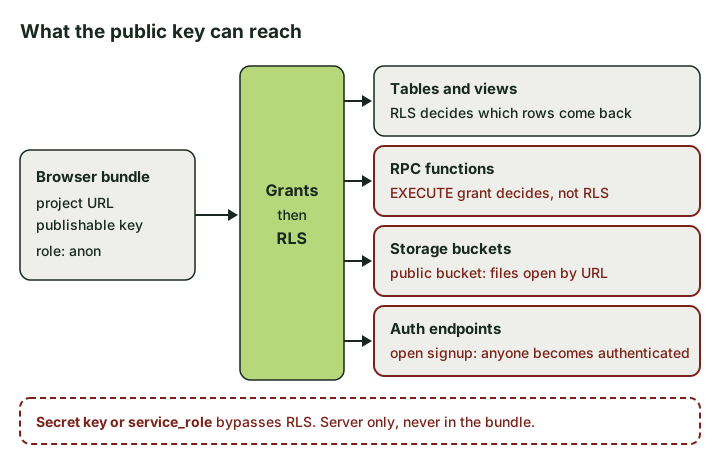 The public key reaches four surfaces. Grants and RLS are the gate for tables. Functions, public buckets and open sign-up each have their own way round it.
Step 1. Find the URL and key your site actually ships
Check the deployed build, not your .env. The build is what visitors get, and it is where a server-only value sometimes ends up by accident (see why a secret in the browser needs rotating, not deleting).
The first command lists the scripts your home page loads. The second searches one of them for the project URL and anything shaped like a Supabase key.
curl -s https://yourapp.example/ | grep -oE 'src="[^"]+\.js"'

curl -s https://yourapp.example/assets/index-abc123.js \
  | grep -oE 'https://[a-z0-9]{20}\.supabase\.co|sb_(publishable|secret)_[A-Za-z0-9_-]+|eyJ[A-Za-z0-9_-]{20,}\.[A-Za-z0-9_-]{20,}\.[A-Za-z0-9_-]+' \
  | sort -u
Split bundles mean several files; the Network tab, filtered to JS, lists them all.
What you want to see is one project URL and one publishable or legacy anon key. What you do not want to see is anything starting sb_secret_, or a JWT whose payload says service_role. Decode a legacy key's payload locally to check the role:
node -e 'console.log(JSON.parse(Buffer.from(process.argv[1].split(".")[1], "base64url")))' "eyJ..."
If it prints "role": "service_role", stop the scan and treat it as an incident. Rotate first, investigate second. What to do when a service-role key is exposed covers that properly.
Set two shell variables for the rest of this (in your own terminal, not a shared doc):
export REF=abcdefghijklmnopqrst
export PUB=sb_publishable_xxx   # or the legacy anon JWT
Step 2. List what the Data API exposes
This step changed in 2026, and plenty of older guides and scanners have not caught up. The Data API used to hand the full OpenAPI description of your schema (every table, column and type) to anyone with the anon key at https://<ref>.supabase.co/rest/v1/. Supabase's changelog announced it was removing that from the anon key, with new projects blocked from 11 March 2026 and all existing projects from 8 April 2026 (the post allowed for the dates slipping, but not moving earlier). With the anon key, or a publishable key, which maps to the same role, you should now get:
{"message":"Access to schema is forbidden","hint":"Accessing the schema via the Data API is only allowed using a secret API key."}
If you get a full spec back instead, write it down and check the changelog for a revised date. It is no longer the expected behaviour.
That closes an easy map. It does not hide your tables: every supabase.from('invoices') call in your bundle names one in plain text. Assume table names are known.
As the owner you can still get the list two ways. From your own terminal with a secret key held in an environment variable (never pasted into a browser or a chat):
curl -s "https://$REF.supabase.co/rest/v1/" -H "apikey: $SUPABASE_SECRET_KEY" | jq -r '.paths | keys[]'
Or, more usefully, ask Postgres directly in the SQL editor which tables the anon role can touch and whether RLS is on:
select c.relname as name,
       c.relkind as kind,              -- r table, v view, m matview, p partitioned
       c.relrowsecurity as rls_on,
       string_agg(distinct g.privilege_type, ', ') as anon_privileges
from pg_class c
join pg_namespace n on n.oid = c.relnamespace
left join information_schema.role_table_grants g
  on g.table_schema = n.nspname and g.table_name = c.relname and g.grantee = 'anon'
where n.nspname = 'public' and c.relkind in ('r','v','m','p')
group by 1, 2, 3
order by rls_on, name;
Rows with anon_privileges filled in and rls_on = false are the ones to look at first. Views need a second look regardless, because a view runs with its owner's rights unless it was created with security_invoker, so rls_on tells you nothing useful there.
One more wrinkle: whether a new table gets anon grants automatically depends on when your project was created and on the Automatically expose new tables setting. Supabase's guide to securing your API has a query for checking your project's default privileges. Older tables keep whatever grants they were born with.
Step 3. Read every exposed table with the key and no session
Now behave like a stranger. For each table, ask for a few rows and an exact count, sending only the publishable key:
curl -s -D - -o /tmp/rows.json \
  "https://$REF.supabase.co/rest/v1/profiles?select=*&limit=3" \
  -H "apikey: $PUB" -H "Prefer: count=exact" | grep -i content-range
cat /tmp/rows.json
The Content-Range header (for example 0-2/1532) tells you how many rows anon can see in total, which matters more than the three you fetched. How to read the outcomes:
| Response | What it usually means | Verdict |
|---|---|---|
| 200 with rows, count > 0 | Anon can read this table | Fine only if it is deliberately public data |
200 with [], count 0 |
RLS is on and no anon policy matches, or the table is empty | Probably fine, but check the table has rows |
401 with code 42501 (permission denied) |
No grant for anon | Good, and the strongest outcome |
404 PGRST205 |
Table not in the exposed schema, or wrong name | Fine, though the error may suggest a similar real table name ("Perhaps you meant...") |
The empty-array case is the classic false sense of security. A table with no rows also returns [], so confirm the real row count with the secret key or SQL before you tick it off.
Pay particular attention to columns, not just rows. A profiles table that is meant to be public might still return email, phone or stripe_customer_id to everyone. RLS filters rows; it does nothing about which columns come back. If some columns should stay private, use a view that selects only the public ones, or column-level grants.
Test writes too, but on a staging copy, not production. A 201 from an anonymous POST into orders is a finding, whatever the screen allows.
Step 4. Check the RPC functions
Functions are where a careful RLS setup quietly leaks. RLS does not apply to calling a function, only to the queries inside it, and a security definer function runs those queries as its owner (usually postgres), so RLS inside it is bypassed too. Postgres also grants EXECUTE to everyone on new functions by default.
List the functions anon can call:
select p.proname, p.prosecdef as security_definer
from pg_proc p
join pg_namespace n on n.oid = p.pronamespace
where n.nspname = 'public'
  and has_function_privilege('anon', p.oid, 'execute')
order by security_definer desc, proname;
Read the body of anything with security_definer = true before you call it, because some functions write or send email. If it is safe to call, try it as a stranger:
curl -s -X POST "https://$REF.supabase.co/rest/v1/rpc/get_dashboard_stats" \
  -H "apikey: $PUB" -H "Content-Type: application/json" -d '{}'
Fixes here are grants, not policies: revoke execute on function ... from anon, public;, then grant it back only to the roles that need it, and check inside the function that the caller is allowed to act on the IDs they passed.
Step 5. Check storage buckets
In the SQL editor:
select id, public, file_size_limit, allowed_mime_types from storage.buckets;
A public bucket means anyone with a file's URL can download it, no policy consulted. Supabase's bucket documentation is clear that access control still applies to uploading, deleting, moving and copying, but not to reading. That is fine for logos and marketing images. It is not fine for invoices, ID scans or anything under a path built from a user ID, since those paths are often guessable or visible in your app's network traffic.
Then check listing from the outside with a throwaway Node script using only the publishable key:
import { createClient } from '@supabase/supabase-js'

const sb = createClient(`https://${process.env.REF}.supabase.co`, process.env.PUB, {
  auth: { persistSession: false },
})
console.log(await sb.storage.listBuckets())
console.log(await sb.storage.from('uploads').list('', { limit: 100 }))
If an anonymous client can list a bucket's contents, it does not need to guess paths at all. Move private files to a private bucket and serve them with short-lived signed URLs. Reading the storage.objects policies line by line is part of the RLS audit, so it is not repeated here.
Step 6. Check the auth settings
Your Auth server publishes its public settings to anyone with the key:
curl -s "https://$REF.supabase.co/auth/v1/settings" -H "apikey: $PUB" \
  | jq '{disable_signup, mailer_autoconfirm, phone_autoconfirm, external}'
Two fields matter most. disable_signup: false means anyone can create an account. mailer_autoconfirm: true means they do not even need to own the email address. Put those together and the authenticated role is one request away for anybody, so a policy written as to authenticated using (true) is a public policy wearing a disguise.
Also check, in the dashboard under Authentication, whether Allow anonymous sign-ins is on. Anonymous users get the authenticated role too, distinguished only by an is_anonymous claim in their JWT. If you enabled it for a guest checkout, every policy that says authenticated now includes strangers unless it checks that claim.
Open sign-up is often the right business choice. Just write your policies as if every signed-in user might be someone you have never met.
Step 7. Run the Security Advisor and the Performance Advisor
Supabase ships deterministic checks called Advisors. Run them in the dashboard, with supabase db advisors from the CLI, or through the MCP get_advisors tool. The security lints that map onto this outside-in scan:
0013_rls_disabled_in_public, the headline one0002_auth_users_exposedand0023_sensitive_columns_exposed0028_anon_security_definer_function_executable0025_public_bucket_allows_listing0012_auth_allow_anonymous_sign_ins0026_pg_graphql_anon_table_exposed, a reminder that GraphQL can be another way in ifpg_graphqlis enabled
The policy-quality lints (always-true policies, trust in user_metadata) belong to the RLS audit.
Run the Performance Advisor too, for a less obvious reason. 0006_multiple_permissive_policies flags tables where several permissive policies are combined with OR, so the loosest one wins: a performance warning and a security clue at once. And 0003_auth_rls_initplan prompts policy rewrites, which is exactly when an ownership check gets "simplified" away. Re-run your Step 3 reads after any rewrite.
Advisors are good at missing switches. They cannot tell whether a policy expresses the right rule.
What automated Supabase scanners report, and what they miss
There are now plenty of third-party tools that take your site URL, pull the project URL and key out of the bundle and probe it. Most do some version of Steps 1 to 6: tables readable as anon, RLS switched off, public or listable buckets, open sign-up. That is useful and cheap. (Our £149 snapshot is a passive outside check too, but it stops at what your site serves publicly, such as headers, exposed files and keys in the bundle. It does not test database rules or access control.)
Their blind spots are predictable:
- They only see table names they can find. With the OpenAPI spec closed to anon keys, a scanner relies on names in your bundle or a wordlist. A table your front end never queries can sit open and unreported.
- They test as anon, or as one throwaway user. The serious Supabase failures are horizontal: user A reading user B's rows, or a member of one organisation reading another's. That is broken object level authorisation, and spotting it needs two accounts in two tenants and knowledge of who should see what. A scanner cannot know your business rules.
- They cannot see server paths. Edge Functions and API routes using the secret key bypass RLS entirely, so the authorisation lives in your code, which no outside scan reads.
- They raise false alarms. "Supabase key exposed in JavaScript" about a publishable key is not a finding. An empty array reported as "secure" may just be an empty table.
- Some create accounts on your project to test the authenticated role. Check what a tool does before pointing it at production.
A clean scan means the obvious doors are shut. It does not mean the rules are right.
When a Supabase security scan finds something
Write down the table, operation, role and the exact request that worked, without pasting real customer records into a ticket. Then fix at the right layer: revoke grants nobody needed, enable RLS, make policies compare ownership or membership against auth.uid(), and lock down functions and buckets.
The full procedure for auditing and rewriting policies (including testing the user A versus user B cases this scan cannot reach) is in our Supabase RLS audit guide. For multi-tenant apps, the authorisation patterns for tenants are worth reading alongside it.
Then run the scan again. Keep the Step 3 commands in a script next to your migrations, so the next AI-generated table gets the same stranger's-eye test before it ships.