 BYTEASSUREStart a review
A Supabase RLS audit has two halves, and you need both. First you read the database: which tables have Row Level Security switched off, what each policy actually says, and which views, functions and storage buckets route around the policies altogether. Then you prove it from the outside, signed in as two real test users, by trying to read, create, change and delete each other's rows through the same API your app uses. The SQL tells you where to look. Only the two-user test tells you whether the boundary holds.
You need the SQL editor (or psql) and two throwaway accounts. For the background on why policies that look fine still leak, see Supabase RLS mistakes that look safe from the front end; this is the checklist you run with the editor open. Use a staging project or branch if you can. Against production, touch only your own test accounts and rows. (If you first want the stranger's view, what your public key reaches with no login at all, run the outside-in Supabase security scan; this guide goes inside.)
Step 1. Find tables where Row Level Security is not enabled
Supabase exposes the public schema through its Data API by default. On most projects, a table in there without RLS can be read, and often written, by anyone holding your publishable (or legacy anon) key, which sits in your browser bundle by design. (Whether anon holds table grants varies by project age and settings, hence the grant columns below.)
select n.nspname as schema,
       c.relname as table_name,
       c.relrowsecurity as rls_enabled,
       c.relforcerowsecurity as rls_forced,
       has_table_privilege('anon', c.oid, 'select') as anon_can_select,
       has_table_privilege('authenticated', c.oid, 'select') as auth_can_select
from pg_class c
join pg_namespace n on n.oid = c.relnamespace
where c.relkind in ('r', 'p')          -- ordinary and partitioned tables
  and n.nspname = 'public'
order by c.relrowsecurity, c.relname;
Rows with rls_enabled = false are your problem list. If anon_can_select is also true, that table is readable by the internet right now. (select tablename from pg_tables where schemaname = 'public' and not rowsecurity; is the short version.) Repeat for any other schema listed under "Exposed schemas" in the API settings.
A table with RLS enabled and no policies is not a leak: with RLS on, nothing is reachable through the API with the publishable key until you add policies. It usually means a feature is quietly broken rather than open.
Step 2. Inventory every policy and read it as a sentence
Next, list what the policies actually say. Postgres keeps them in the pg_policies view.
select tablename, policyname, permissive, roles, cmd,
       qual       as using_expr,
       with_check as check_expr
from pg_policies
where schemaname = 'public'
order by tablename, cmd;
Go table by table and say each rule out loud: "a signed-in user can update rows where user_id is their own ID, and the row must still be theirs afterwards". If you cannot make that sentence, or it describes a different rule from the one you meant, you have found something.
Then search for the policies that most often turn out to be wrong:
select tablename, policyname, cmd, roles, qual, with_check
from pg_policies
where schemaname in ('public', 'storage')
  and (
        qual = 'true'
     or with_check = 'true'
     or qual ilike '%auth.uid() is not null%'
     or qual ilike '%auth.role()%'
     or coalesce(qual, '') || coalesce(with_check, '') ilike '%user_metadata%'
  );
What each hit means:
truelets every row through for the listed roles. Fine for a genuinely public table such as published blog posts read byanon. Not fine for anything with an owner.auth.uid() is not nullorauth.role() = 'authenticated'proves only that someone signed in. Anyone can sign up, so on most apps this is the same astrue.user_metadatais data the user can edit about themselves. A policy that trusts a role or organisation stored there can be talked round. The advisor flags this one as an error.
Two Postgres rules change how you read the list. Permissive policies for the same command are combined with OR, so one broad policy cancels out a careful one next to it; you have to read them together. And on an update policy with no WITH CHECK, Postgres reuses the USING expression for the new row. The CREATE POLICY documentation spells out both. So a missing WITH CHECK is not automatically a hole. A WITH CHECK (true), or a check that tests a different column from the one that carries ownership, is.
Check the roles column too: a policy to public covers anon as well, rarely what anyone meant for writes.
Step 3. Look for paths that skip RLS entirely
A perfect policy does nothing if the request never meets it. Three common routes around it:
Views. A view created by the postgres user runs with that user's rights, so it bypasses RLS on the underlying tables unless you create it with security_invoker = true (Postgres 15 and later). The Supabase RLS guide covers this. Find the risky ones:
select c.relname as view_name, c.relkind, c.reloptions,
       has_table_privilege('anon', c.oid, 'select') as anon_can_select
from pg_class c
join pg_namespace n on n.oid = c.relnamespace
where n.nspname = 'public'
  and c.relkind in ('v', 'm')
  and coalesce(array_to_string(c.reloptions, ','), '')
      !~* 'security_invoker=(true|on|1|yes)';
Materialised views (relkind = 'm') never apply RLS, so treat any in an exposed schema as public.
Security definer functions. A security definer function runs as the role that created it, which usually means it ignores RLS. In an exposed schema it can be called directly at /rest/v1/rpc/<name>, whatever your UI does with it.
select n.nspname as schema, p.proname as function_name,
       pg_get_function_identity_arguments(p.oid) as args,
       has_function_privilege('anon', p.oid, 'execute') as anon_can_execute,
       has_function_privilege('authenticated', p.oid, 'execute') as auth_can_execute,
       p.proconfig as settings
from pg_proc p
join pg_namespace n on n.oid = p.pronamespace
where p.prosecdef
  and n.nspname = 'public';   -- add any other exposed schemas
For each result, read the body. Does it check auth.uid() against the rows it touches, or does it trust an ID passed in as an argument? A function called get_invoice(invoice_id uuid) that selects by that ID and nothing else is an open door. Also check settings contains search_path="" or a fixed path; the advisor warns when it does not.
The secret key. Requests made with the secret key (or the legacy service_role key) bypass RLS when they carry no user token. Any Edge Function or server route using it has to do its own authorisation. If you suspect that key reached the browser, stop the audit and deal with that first; see what to do when a service role key is exposed.
Step 4. Check storage policies and bucket settings
Files live in storage.objects, and access is controlled by policies on that table, not on yours. Start with the buckets:
select id, name, public from storage.buckets;
Any bucket with public = true serves downloads to anyone holding the URL, with no policy consulted; per the bucket fundamentals page, policies still govern uploads, deletes, moves and copies. A bucket of ID scans or invoices should not be public, however unguessable the filenames look.
Then read the policies:
select policyname, cmd, roles, qual, with_check
from pg_policies
where schemaname = 'storage' and tablename = 'objects';
Good policies tie the path to the user, typically with (storage.foldername(name))[1] = (select auth.uid()::text) alongside a bucket_id check. A policy that only checks bucket_id = 'avatars' lets any signed-in user read, overwrite or delete anyone's avatar, depending on the command. Note that upserts need select and update as well as insert, so teams sometimes widen those to get uploads working and forget to narrow them again. The storage access control guide has the patterns.
Step 5. Run the Security Advisor and compare
In the dashboard, open Advisors, then Security Advisor (/dashboard/project/<ref>/advisors/security). The CLI equivalent is supabase db advisors. The advisor lints that matter most for this audit:
| Lint | What it means |
|---|---|
0013_rls_disabled_in_public |
Table in public without RLS |
0010_security_definer_view |
View bypasses RLS |
0024_permissive_rls_policy |
Always-true condition on insert, update or delete. It deliberately skips select ... using (true), so a table every signed-in user can read will not show here |
0015_rls_references_user_metadata |
Policy trusts user-editable metadata |
0028 / 0029 security definer function executable |
anon or signed-in users can call a definer function |
0025_public_bucket_allows_listing |
Public bucket contents can be listed |
0007_policy_exists_rls_disabled |
Policies written, RLS never switched on |
Use it as a cross-check on your SQL, not a replacement. It knows nothing about your business rules. auth.uid() = user_id passes every lint, and is still wrong if users are meant to share rows inside an organisation, or if the real owner is an org_id the policy never checks (the multi-tenant authorisation article goes into that). A clean advisor page is a good sign and nothing more.
Step 6. The two-user test
Now prove it. Create two ordinary accounts through your app's normal sign-up, Alice and Bob. Have Bob create one row in each table that holds user data. Then, signed in as Alice, attack Bob's rows through the API. Use the publishable key your app ships, so the test sees what an attacker sees.
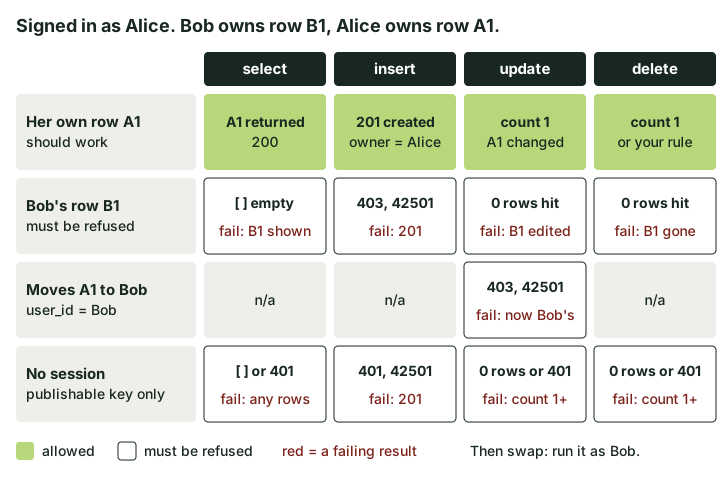 Run every row of this for each table, then swap the users. Red text is what a broken policy returns.
With supabase-js (v2), in a throwaway Node script:
import { createClient } from '@supabase/supabase-js'

const url = process.env.SUPABASE_URL
const key = process.env.SUPABASE_PUBLISHABLE_KEY // or the legacy anon key

async function signIn(email, password) {
  const client = createClient(url, key, { auth: { persistSession: false } })
  const { data, error } = await client.auth.signInWithPassword({ email, password })
  if (error) throw error
  return { client, id: data.user.id }
}

const alice = await signIn(process.env.ALICE_EMAIL, process.env.ALICE_PASSWORD)
const bob = await signIn(process.env.BOB_EMAIL, process.env.BOB_PASSWORD)

const { data: bobRow } = await bob.client
  .from('notes').insert({ user_id: bob.id, body: 'Bob only' }).select().single()

// 1. Read Bob's row as Alice. Pass: [] and no error.
console.log(await alice.client.from('notes').select('*').eq('id', bobRow.id))

// 2. Insert a row claiming to be Bob. Pass: error code 42501.
console.log(await alice.client.from('notes').insert({ user_id: bob.id, body: 'forged' }))

// 3. Edit Bob's row. Pass: no error, count 0, and Bob's row unchanged.
console.log(await alice.client.from('notes')
  .update({ body: 'edited by Alice' }, { count: 'exact' }).eq('id', bobRow.id))

// 4. Move Alice's own row to Bob. Pass: error code 42501.
const { data: aliceRow } = await alice.client
  .from('notes').insert({ user_id: alice.id, body: 'Alice' }).select().single()
console.log(await alice.client.from('notes')
  .update({ user_id: bob.id }, { count: 'exact' }).eq('id', aliceRow.id))

// 5. Delete Bob's row. Pass: no error, count 0, and Bob's row still there.
console.log(await alice.client.from('notes')
  .delete({ count: 'exact' }).eq('id', bobRow.id))

// Finally, check from Bob's side: his row untouched, nothing forged or moved in.
console.log(await bob.client.from('notes').select('*').eq('user_id', bob.id))
What a pass looks like: the select returns data: [] with no error. The forged insert comes back with code: '42501' and the message new row violates row-level security policy for table "notes" (over raw HTTP that is a 403, or 401 for an anonymous request, per the PostgREST error table). The update and delete against Bob's row return no error and should report count: 0. The ownership move fails with 42501. Bob's final read shows exactly one row, his, as he left it. No forged row, no row of Alice's.
What a fail looks like: Bob's row in Alice's select results, a 201 on the forged insert, count: 1 on the update or delete, or Alice's row now belonging to Bob.
Three things trip people up here:
- "No error" does not mean "blocked" on updates and deletes. RLS filters the rows the statement can see, so an update against a row you cannot see simply matches nothing and succeeds. That is why the script asks for a count, and why it ends by reading from Bob's side. Treat that final read (or a look in the SQL editor) as the deciding check: if
countcomes backnullon your client version, the Bob-side read still tells you the truth. Checking onlyerrorgives you a false pass on the most dangerous operations. - Adding
.select()to a write can hide a weak insert policy. Returning the row also applies your select policy to it, so a forged insert can fail with 42501 because Alice cannot read the result, even though the insert rule itself would have let it through. Run the write tests without.select()and confirm the outcome from Bob's side or the SQL editor. - Updates need a select policy too. If Alice cannot update her own row, check that she can select it before rewriting the update policy.
Repeat with no session at all (a client created with the key and no sign-in) to cover anon. Then call each security definer function from Step 3 as Alice with Bob's IDs as arguments, using alice.client.rpc('function_name', { ... }). And for storage, try alice.client.storage.from('bucket').download('<bob-id>/file.pdf') and an upload into Bob's folder.
If you prefer raw HTTP, sign in with POST /auth/v1/token?grant_type=password, take access_token from the response, and send it as Authorization: Bearer <token> alongside the apikey header on /rest/v1/notes?id=eq.<bob-row-id>. Same expectations: [] for the read, 403 with 42501 for the forged insert.
How to fix Supabase RLS failures you find
Keep the fixes boring, and in migrations rather than clicked into the dashboard:
alter table public.notes enable row level security;

create policy "owners read their notes" on public.notes
  for select to authenticated
  using ((select auth.uid()) = user_id);

create policy "owners update their notes" on public.notes
  for update to authenticated
  using ((select auth.uid()) = user_id)
  with check ((select auth.uid()) = user_id);
For views, recreate them with (security_invoker = true), or revoke select from anon and authenticated. Move security definer functions into a schema the API does not expose, or revoke execute on function ... from public, anon, authenticated and grant back only what is needed, and add an auth.uid() check inside the body. Flip private buckets to non-public and scope storage policies to the user's folder. Where ownership should never come from the browser, set it with a column default of auth.uid() and drop it from the insert payload.
Then rerun the two-user script until every red cell turns into the expected result, and keep the script in CI so the next migration cannot quietly undo it.
What a Supabase RLS audit will not catch
This procedure checks that one user cannot reach another user's data. It will not tell you whether your organisation and role model is right, or whether an Edge Function holding the secret key checks permissions. Every finding here sits under OWASP's Broken Access Control. If your app has teams, admins, payments or sensitive records that two test accounts cannot cover, that is where a deep review earns its keep: the same negative tests, run against each real role and data path, with written authorisation.