 BYTEASSUREStart a review
An OpenAI key in frontend code belongs to whoever opens DevTools. If your app calls OpenAI, Anthropic or Gemini straight from the browser, the key travels with every request, and copying it takes about as long as reading this sentence. OpenAI's own API reference says not to expose your key in any client-side code such as browsers or apps, and Anthropic and Google say the same about theirs.
This is the AI-specific version of the problem. For how build tools leak environment variables and how to tell a public key from a private one in general, read API key in frontend code. For the incident side once a privileged key has leaked (exposure window, logs, who to tell), read what to do when a secret reached the browser. This article covers what an AI key in particular gives away, how to check for one, how to build the replacement properly, and how to rotate.
What someone does with an AI key from your bundle
They spend your money. An AI key is a pay-as-you-go credit card with no PIN. Whoever holds it can run their own workloads, power their own product, or resell access, and the bill lands on your account. There are automated scanners hunting for exactly these key formats in public code and sites. You will not get a polite email first.
They use your rate limits. Even with plenty of credit, your organisation has per-model rate limits. Someone else's traffic on your key means your real users start getting 429 errors and your AI feature looks broken for reasons that don't show up in your own logs.
They put your account at risk. Requests made with your key are your requests as far as the provider is concerned. Content that breaks the provider's usage policies, sent under your organisation, can bring enforcement down on your account.
They may read data, not just spend. This depends on what the key can reach. An unrestricted OpenAI key can list the files uploaded to its project (and download some of them, depending on their purpose), and work with vector stores, assistants and batch jobs. An Anthropic key reaches the files and batches stored in its workspace. If your app uploads customer documents for analysis, a leaked key can be a data incident as well as a cost one.
They see your prompts. Your system prompt is in the bundle anyway if the browser builds the request. That is rarely a secret worth protecting, but it does show exactly how to get your feature to do what an attacker wants.
How to check your app for an AI key
Do this on the live site, logged in, after using the AI feature at least once.
Network tab. Open DevTools, Network, filter Fetch/XHR, and trigger the feature. Look at where requests go:
api.openai.comwithAuthorization: Bearer sk-...api.anthropic.comwith anx-api-keyheader (the Anthropic SDK also addsanthropic-dangerous-direct-browser-access: truewhen it runs in a browser, which is about as clear a confession as a header can make)generativelanguage.googleapis.comwith anx-goog-api-keyheader or a?key=parameter
Any of these from the browser means the browser holds the key. The finding is that simple.
Search the loaded scripts. Cmd+Option+F (Ctrl+Shift+F on Windows) and search for dangerouslyAllowBrowser, sk-proj-, sk-ant-, OPENAI_API_KEY, ANTHROPIC_API_KEY, GEMINI_API_KEY and generativelanguage. The general grep for build output is in the API key detection guide; add those strings to it.
Look for the indirect leaks. These catch people who already know not to hard-code the key:
- An endpoint that returns the key. A Supabase Edge Function or
/api/configroute that sends{ openaiKey: "sk-..." }to the browser so the client can call OpenAI "securely". The key is still in the browser; it just arrived later. - A key stored in a database table the client can read, such as a
settingsorintegrationsrow fetched with the public Supabase key. Check what that table's RLS allows. - A mobile build. In Expo,
EXPO_PUBLIC_OPENAI_API_KEYis compiled into the app that every user downloads.
The dangerouslyAllowBrowser flag
The official OpenAI and Anthropic TypeScript SDKs refuse to run in a browser unless you pass dangerouslyAllowBrowser: true, because doing so exposes your secret credentials. The flag exists for prototypes, internal tools where each user brings their own key, and similar cases where the key in the browser is meant to be there.
It is not there for a public product with your key in it. If an AI assistant added it because the chat feature threw an error, the error was correct.
There are legitimate ways to talk to a model from the browser, and they all avoid shipping your long-lived key:
- Short-lived tokens minted by your server. OpenAI's Realtime API is designed this way. Your server calls
POST /v1/realtime/client_secretswith the real key and gives the browser an ephemeral credential for one session (OpenAI WebRTC guide). The endpoint that mints the token still needs authentication and limits, or you have rebuilt the leak. - Firebase AI Logic for Gemini. Client apps call Gemini through Firebase's proxy rather than holding a Gemini key, and Firebase AI Logic supports App Check to keep other clients out, and applies a per-user rate limit (100 requests per minute by default, per its quotas page). For a direct Gemini API key, Google's API key docs say not to hard-code it in web or mobile apps and to run a backend proxy instead.
For everything else, the answer is a server route.
The fix: an authenticated proxy with per-user limits
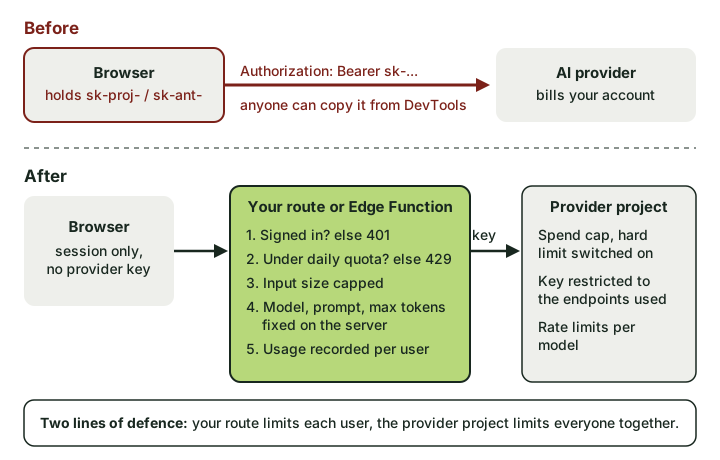 Two lines of defence after the fix: your route limits each user, and the provider project limits everyone together.
The basic Next.js route handler pattern is in the general guide. Moving the key to a server route is the easy half. The half that matters for AI is making sure the new route can't be used as a free, unlimited model endpoint, because that is what an unauthenticated /api/chat is.
Here is a Supabase Edge Function version, since that is where most Lovable and Bolt apps end up, with the decisions that matter marked:
// supabase/functions/summarise/index.ts
import { createClient } from "npm:@supabase/supabase-js@2";
import Anthropic from "npm:@anthropic-ai/sdk";

const anthropic = new Anthropic({ apiKey: Deno.env.get("ANTHROPIC_API_KEY")! });
// Supabase injects the project's publishable keys as a JSON dictionary
const PUBLISHABLE_KEY = JSON.parse(Deno.env.get("SUPABASE_PUBLISHABLE_KEYS")!).default;
const DAILY_TOKEN_LIMIT = 50_000; // per user; pick a number your margins can absorb

Deno.serve(async (req) => {
  const authHeader = req.headers.get("Authorization") ?? "";
  const supabase = createClient(Deno.env.get("SUPABASE_URL")!, PUBLISHABLE_KEY, {
    global: { headers: { Authorization: authHeader } },
  });

  // 1. Who is asking? Verified with Supabase, not trusted from the body.
  const { data: { user } } = await supabase.auth.getUser(authHeader.replace("Bearer ", ""));
  if (!user) return new Response("Unauthorised", { status: 401 });

  // 2. How much have they used today? (ai_usage is readable only by its owner via RLS)
  const since = new Date(Date.now() - 86_400_000).toISOString();
  const { data: rows } = await supabase.from("ai_usage").select("tokens").gte("created_at", since);
  const used = (rows ?? []).reduce((sum, r) => sum + r.tokens, 0);
  if (used >= DAILY_TOKEN_LIMIT) return new Response("Daily limit reached", { status: 429 });

  // 3. Accept only the user's text. The model, prompt and output cap are fixed here.
  const { text } = await req.json();
  if (typeof text !== "string" || text.length > 8_000) return new Response("Bad request", { status: 400 });

  const msg = await anthropic.messages.create({
    model: Deno.env.get("SUMMARY_MODEL")!,
    max_tokens: 600,
    system: "Summarise the user's text in plain English for a customer.",
    messages: [{ role: "user", content: text }],
  });

  // 4. Record what it actually cost.
  await supabase.from("ai_usage").insert({
    user_id: user.id,
    tokens: msg.usage.input_tokens + msg.usage.output_tokens,
  });

  const out = msg.content.find((b) => b.type === "text");
  return Response.json({ summary: out?.type === "text" ? out.text : "" });
});
Store the key with supabase secrets set ANTHROPIC_API_KEY=... (or the OpenAI or Gemini equivalent). The points that carry over to any stack:
- Authenticate first. No session, no model call. If the feature must work for anonymous visitors, you need per-IP limits and a bot check such as Cloudflare Turnstile, and you should accept that this is weaker.
- Fix the model, system prompt and output cap on the server. If the client can send
model, someone will ask for your most expensive one. If the client can send the system prompt, your route is a general-purpose chatbot on your bill. - Cap input size. Long inputs cost money too.
- Count usage per user from the provider's response, not from a guess. Both OpenAI and Anthropic return token counts with each response.
- Write the usage row where the user can't edit it. In the example, the RLS on
ai_usageshould allow the owner to select and insert their own rows but not update or delete them, or someone will zero their own counter. Better still, insert with the service role from inside the function.
This counter isn't perfectly race-free. Fire twenty requests at once and a few may slip past the limit before the rows land. For most apps that is an acceptable rounding error; if it isn't, use an atomic counter (a Postgres function with update ... returning, or Redis).
Provider-side limits: the second line
Your route limits each user. The provider console limits the whole key, which is what saves you if your route has a bug or the key leaks again.
| Provider | Separate it | Cap the spend | Narrow the key |
|---|---|---|---|
| OpenAI | One project per app and environment, with its own keys | Project monthly spend limit. Alerts alone don't stop requests; turn on "Enforce a hard limit", after which requests return 429 (OpenAI notes spend can slightly overshoot because enforcement is not instant) |
Restricted key permissions, so the key can call the model endpoints you use and nothing else (no files or assistants if you don't use them) |
| Anthropic | A workspace per app, with keys scoped to that workspace | Workspace spend limits, set lower than the organisation limit (Anthropic workspaces) | Workspace rate limits per model on requests and tokens per minute |
| Gemini | A Google Cloud project per app | Project spend caps in AI Studio, still marked experimental, and batch jobs can overshoot them (see AI Studio's billing docs) | API key restrictions in the Google Cloud console, limited to the Generative Language API |
OpenAI's spend limits guide covers the project and organisation settings. Set the cap at a figure you'd be annoyed but not ruined by, rather than one far above normal usage "to be safe". The whole point is that it trips.
Rotating the key
If the key has already shipped in a public bundle, treat it as copied. Then:
- Revoke now if abuse is under way. Check the provider's usage page first. If there is spend you don't recognise, revoke immediately and accept that the AI feature is down for an hour. On OpenAI, delete the key from the API keys page of its project and check usage by key; Anthropic's guidance for a suspected compromise is to delete the key from the Console's API keys page (Anthropic support).
- Create the replacement in the right place. A new project or workspace with the spend cap and restrictions above, and the key stored only as a server secret with no
NEXT_PUBLIC_,VITE_orEXPO_PUBLIC_prefix (which prefixes ship to the browser, per framework). - Ship the proxy and the frontend change together. Deploy the server route with the new key, then the frontend that calls it and no longer contains the old one.
- Revoke the old key if you didn't in step 1. Removing it from the code does nothing to the copies.
- Review what it touched. Usage by key and model over the exposure window, and any files, vector stores or batches you don't recognise. The wider investigation steps are in the incident guide.
One thing not to rely on: OpenAI and Anthropic are both GitHub secret scanning partners, so a key pushed to a public GitHub repository is often reported and deactivated automatically (GitHub supported patterns). A key sitting in your production JavaScript never touches GitHub, so nobody revokes it for you.
Verify the fix
- The Network tab shows AI requests going to your own domain or
*.supabase.co/functions/v1/..., never to the provider. - Searching the live scripts for
sk-proj-,sk-ant-,dangerouslyAllowBrowserand the env var names finds nothing. curl -X POST <your function URL> -d '{"text":"hi"}'with no session returns 401.- With a valid session, sending
{"text":"hi","model":"<your priciest model>"}still uses your fixed model (check the provider's usage page). - Lower the per-user limit to something tiny for a test account, hit it, and confirm you get 429.
- The provider console shows a spend cap on the project or workspace, and the old key is listed as revoked or gone.
False alarms
An OpenAI SDK import in your client bundle is not, by itself, a leaked key. Some generated code imports the SDK only for its types, or bundles it for a feature that calls your proxy. Look for an actual key or dangerouslyAllowBrowser. An ephemeral Realtime credential in the browser is expected and short-lived. And a request to generativelanguage.googleapis.com from a Firebase AI Logic app goes through Firebase's setup, not a raw Gemini key; check your Firebase config before panicking.
If you'd like someone else to look, the two-account check includes searching the live bundle and traffic for AI and other secret keys, alongside testing whether one user can reach another's data. It is not a penetration test, but it will tell you whether your OpenAI key is sitting in the frontend.