 BYTEASSUREStart a review
NEXT_PUBLIC_ vs secret key comes down to one rule. A variable whose name starts with your framework's public prefix (NEXT_PUBLIC_, VITE_, EXPO_PUBLIC_, PUBLIC_) is pasted into the JavaScript you send to every visitor at build time. Everything else stays on the server, if you have one. So a secret must never carry the prefix, and no secrets in the client bundle means no prefix on anything you would not print on your homepage.
That rule is right but incomplete, because each framework has ways to ship an unprefixed variable without touching its name. If you have found a key in your bundle and want to know whether that key matters, how to judge an API key in frontend code covers the classification. This one is about how values get there.
How build-time inlining works
Every framework here does the same trick. When you run the build, the bundler looks for expressions like process.env.NEXT_PUBLIC_API_URL or import.meta.env.VITE_API_URL and replaces them with the literal value from the build environment. The output file no longer says "read the API URL". It says "https://api.example.com".
Three consequences explain most of the confusion:
- The value is frozen at build time. The Next.js docs are explicit that changing a
NEXT_PUBLIC_variable afternext builddoes nothing; a Docker image promoted from staging to production keeps the staging value. Rotating a public value means rebuilding. - Only the exact, static expression is replaced.
process.env[name]orconst { X } = process.envare not inlined in Next.js or Expo, which is why a "clever" config helper can silently produceundefinedin the browser. - The value lives in a static file on a CDN. Anyone can download it without logging in, and copies outlive your next deploy.
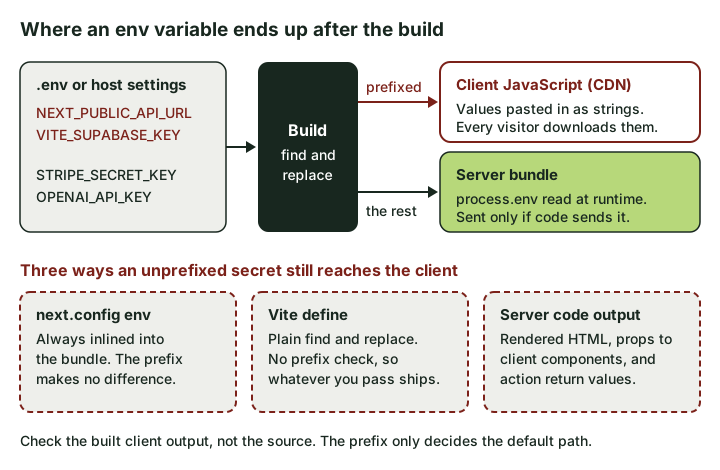 The prefix decides the default path. The three dashed routes are how unprefixed secrets reach the browser anyway.
Which environment variables are public
| Framework | Reaches the browser | Server-only access | Guard rail that fails the build |
|---|---|---|---|
| Next.js (App Router) | NEXT_PUBLIC_*, plus anything in next.config env |
Server Components, Route Handlers, Server Actions read process.env |
import "server-only" in secret-touching modules |
| Vite single-page app | VITE_* (or your envPrefix) via import.meta.env |
None. There is no server | Vite refuses an empty envPrefix |
| TanStack Start | VITE_* via import.meta.env (PUBLIC_* if built with Rsbuild) |
process.env inside server functions |
Keep secret reads inside createServerFn handlers |
| Expo | EXPO_PUBLIC_*, and everything in app.config extra |
Only code that runs on a server, such as API routes | None. Assume the bundle is public |
| Astro | PUBLIC_* via import.meta.env; astro:env client variables |
Everything else; astro:env/server for secrets |
astro:env has no "client secret" option |
| SvelteKit 3 | Variables marked public: true in src/env.ts |
$app/env/private |
Importing it from browser code is an error |
| SvelteKit 2 | PUBLIC_* via $env/static/public or $env/dynamic/public |
$env/static/private, $env/dynamic/private |
Importing private modules into browser code is an error |
Next.js App Router
The App Router gives you three server-only places to use a secret, and the Next.js data security guide is the document to read:
- Server Components (the default, anything without
"use client") can readprocess.env.STRIPE_SECRET_KEYdirectly. The component code never ships to the browser. - Route Handlers (
app/api/.../route.ts) run only on the server. - Server Actions (
"use server") run on the server, but they are public POST endpoints. Next.js says to treat them as reachable by direct request and check authentication inside each one.
The leaks in Next.js rarely come from the prefix. They come from the boundary between server and client:
Rendering or passing the secret. A Server Component can read a secret safely. What it renders, and the props it passes to a Client Component, are serialised and sent to the browser. <Checkout config={process.env} /> is a leak with no NEXT_PUBLIC_ in sight. So is passing an SDK config object "for convenience". Pass the fields the UI needs, nothing else. (The same mechanism leaks whole database rows; how to spot that in the RSC payload is in the Next.js pre-launch scan.)
Return values from Server Actions. These are serialised to the client too. Return { ok: true }, not the record you just wrote.
The env key in next.config. Values set there are always inlined into the bundle, and the env reference page notes the NEXT_PUBLIC_ prefix has no effect on them. A generated config with env: { OPENAI_API_KEY: process.env.OPENAI_API_KEY } publishes the key as surely as renaming it would.
Shared modules. A lib/openai.ts imported by both a Route Handler and a Client Component gives the client undefined, which is where the next bad decision starts (see below). Put import "server-only" at the top of any module that touches a secret, so the build fails if client code imports it.
Vite single-page apps
Plain Vite is the strictest case, because a single-page app has no server at all. The Vite env guide says VITE_* values are bundled into your source at build time and should not contain sensitive information such as API keys. Unprefixed variables are simply not available in the browser (import.meta.env.DB_PASSWORD is undefined).
So there is no safe way to use a secret from a Vite SPA; the call has to move to an Edge Function, a serverless function or a small API. Two ways generated configs defeat Vite's protection:
- Setting
envPrefixto''. Vite now throws an error if you try, according to the shared options docs. - Using
defineorloadEnv(mode, process.cwd(), '')to push unprefixed variables into the bundle.defineis a plain find-and-replace with no prefix check. Whatever you hand it ships.
TanStack Start
TanStack Start (which Lovable now uses for new projects) is Vite with a server attached, so you get both halves. Its environment variables guide puts it plainly: server functions can read any variable from process.env, and client code can only read VITE_-prefixed ones through import.meta.env (or PUBLIC_ if you build with Rsbuild instead of Vite).
// src/server/summarise.ts
import { createServerFn } from "@tanstack/react-start";
import OpenAI from "openai";
import { getSessionUser } from "./auth"; // your own session check

export const summarise = createServerFn({ method: "POST" })
  .validator((text: string) => text.slice(0, 4000))
  .handler(async ({ data }) => {
    const user = await getSessionUser();
    if (!user) throw new Error("Unauthorised");

    const openai = new OpenAI({ apiKey: process.env.OPENAI_API_KEY }); // no VITE_
    const res = await openai.responses.create({
      model: process.env.OPENAI_MODEL!,
      input: `Summarise this for a customer:\n\n${data}`,
    });
    return { summary: res.output_text }; // only what the UI needs
  });
The same two cautions as Next.js apply. Return values travel to the browser, and a server function is an HTTP endpoint anyone can call, which is why the session check sits inside the handler rather than in the component that calls it.
Expo
Expo inlines EXPO_PUBLIC_* variables into the JavaScript bundle inside your app binary, and the Expo docs warn they are visible in plain text in the compiled app. Two less obvious points:
extrainapp.config.jsis public too. It is written into the app's manifest soexpo-constantscan read it at runtime. Putting a secret there instead of in anEXPO_PUBLIC_variable changes the hiding place, not the outcome.- "Secret" visibility on Expo's hosted environment variables does not protect values you embed. The Expo Services env docs say so directly: secrets add nothing for values that end up in the app itself. It hides the value in the dashboard and logs, which helps for build-time credentials only.
A mobile app has no server of its own, so any call that needs a secret goes through one you run: an Expo Router API route on a server, or an Edge Function.
Astro and SvelteKit
Astro follows Vite's model with its own prefix. The Astro docs say every variable is available in server-side code but only PUBLIC_* ones in client-side code. The newer astro:env schema is stricter: each variable gets a context (client or server) and an access (public or secret), and there is no client-side secret combination.
SvelteKit changed in version 3. Variables are now declared in src/env.ts, private by default, and only those marked public: true can be imported in the browser from $app/env/public. The SvelteKit docs state that $app/env/private cannot be imported into code that runs in the browser. On SvelteKit 2, the $env/static/private and $env/dynamic/private modules give the same guarantee, and PUBLIC_ is the prefix for the public ones. Those $env/* modules still work in version 3 but are deprecated and due to go in version 4.
NEXT_PUBLIC_ vs secret key, and the "undefined" trap
Most published secrets start as an undefined. Client code reads an unprefixed key, gets nothing, and someone (often an AI assistant asked to "fix the error") adds the public prefix. It works, and the key is now in a public file on your CDN. The API key detection guide walks through how that plays out; the point here is that the undefined was the framework doing its job. Move the call, not the variable:
| What broke | Wrong fix | Right fix |
|---|---|---|
| Client Component calls a paid API with a secret key | Add NEXT_PUBLIC_ |
Route Handler or Server Action that checks the session, then calls the API |
| Vite SPA calls a paid API | Add VITE_ |
Edge or serverless function; the SPA calls that |
| Expo app needs a secret | Add EXPO_PUBLIC_ or move it to extra |
API route or function on a server you control |
A value is undefined in the browser and is not secret (a public URL, a publishable key) |
n/a | Adding the prefix is correct here |
The last row matters. A Supabase publishable key, a Stripe pk_ key or your own API's base URL is meant to be public, and the prefix is the right tool. Before adding one, ask whether you would put the value on a billboard.
If the secret already shipped, renaming it back is not the fix. Rotate it first; the frontend secrets response plan covers what to do about the exposure window.
How to check the built output
Your source code shows intent. The build output shows what actually shipped. The most reliable way to check is a canary: build locally with fake, unmistakable values in every server-only variable, then search the client output for them.
OPENAI_API_KEY=CANARY_openai_7f3a \
STRIPE_SECRET_KEY=CANARY_stripe_7f3a \
SUPABASE_SECRET_KEY=CANARY_supabase_7f3a \
npm run build

# Next.js: client chunks, plus prerendered HTML and RSC payloads
grep -rl "CANARY_" .next/static
grep -rl --include='*.html' --include='*.rsc' "CANARY_" .next/server/app

# Vite, Astro (static): dist/   SvelteKit: .svelte-kit/output/client/
grep -rl "CANARY_" dist .svelte-kit/output/client 2>/dev/null
Any hit is a leak, and the file name tells you which page or chunk. For TanStack Start and server-rendered Astro, the build log names the client output folder (it varies by version and adapter); search that, not the server folder. For Expo, npx expo export writes the bundles to dist/; on native platforms they may be Hermes bytecode, but string literals survive, so strings piped into grep still finds them.
Real environment variables set at the shell take priority over .env files in Next.js and Vite, so the canaries win without editing anything.
Two false alarms worth knowing:
- Hits in server output are expected.
.next/server(outside prerendered pages),dist/serverand similar folders hold server code that legitimately contains or reads secrets. Only the client side matters here. - Public keys are not leaks. A Supabase publishable key in the bundle is the design; whether it is safe depends on your database rules (is the Supabase anon key safe?).
Then repeat against the live site, because your host's build environment can differ from your laptop: open DevTools, search all loaded scripts (Cmd+Option+F, or Ctrl+Shift+F) for prefixes like sk_live, sk-proj- and sb_secret_.
How to structure your env files
A layout that makes the public and private halves obvious at a glance:
# .env.example  (committed, names only, no real values)
# --- Public: inlined into the browser bundle at build time ---
NEXT_PUBLIC_SUPABASE_URL=
NEXT_PUBLIC_SUPABASE_PUBLISHABLE_KEY=
NEXT_PUBLIC_STRIPE_PUBLISHABLE_KEY=

# --- Server only: never prefix these ---
SUPABASE_SECRET_KEY=
STRIPE_SECRET_KEY=
STRIPE_WEBHOOK_SECRET=
OPENAI_API_KEY=
- Commit
.env.example; keep real values in.env.local(or.env.[mode].local), which Next.js and Vite both treat as local-only. Check.gitignorecovers.env*.local, and.envtoo if anyone has ever put a real value in it. - Put production secrets in your host's environment settings, not in a file. Remember that a prefixed variable set there is still inlined at build time.
- Never give a public prefix to a name containing SECRET, PRIVATE, TOKEN, PASSWORD or SERVICE_ROLE. A one-line check you can run in CI:
grep -rhoE '(NEXT_PUBLIC|VITE|EXPO_PUBLIC|PUBLIC)_[A-Z0-9_]*(SECRET|PRIVATE|TOKEN|PASSWORD|SERVICE_ROLE)[A-Z0-9_]*' \
  --exclude-dir=node_modules --exclude-dir=.next --exclude-dir=dist . | sort -u
It will not catch NEXT_PUBLIC_OPENAI_API_KEY (KEY is left out because publishable keys use it too), so treat it as a tripwire and the canary build as the real check.
The prefix rule takes thirty seconds to learn. The leaks that survive it are props, return values, config env blocks and define entries, and the only way to see those is to look at what you actually built.