 BYTEASSUREStart a review
A Next.js security scan before launch should answer one question: can a stranger, or a signed-in user who is not the owner, reach data or actions they should not? Most of the Next.js-specific ways that goes wrong come from one assumption, that a check in one place covers every way into the app. It doesn't. Pages, server actions, route handlers and the proxy (formerly middleware) are separate entry points, and each one needs its own check.
This is the list I would work through on a Next.js app hosted on Vercel, including apps generated with v0, before real users arrive. Each item has a command or a place to look. You can do most of it in an afternoon.
Start with the version, because of the proxy bypasses
Run this in the project:
npm ls next
# or, if you use pnpm
pnpm why next
Then compare the result with the Next.js security advisories. The one everybody remembers is CVE-2025-29927: a request carrying an internal x-middleware-subrequest header could skip middleware entirely, so any authorisation done only in middleware was bypassed. It was fixed in 15.2.3, 14.2.25, 13.5.9 and 12.3.5. Vercel-hosted deployments were protected at the platform level. Self-hosted ones (a Docker container, a VPS, some "deploy anywhere" templates) were not.
That advisory was not a one-off. In 2026 alone the list gained four more middleware and proxy bypasses, each tied to a particular setup: Pages Router apps using i18n, dynamic route parameter injection, segment-prefetch routes (which needed a second fix), and App Router apps built with Turbopack that have a single locale. The same year brought several critical remote code execution fixes in image optimisation and next/og, which is reason enough to stay on a patched release. Treat the bypasses as the strongest argument in this article: if your access control lives only in the proxy, you are one advisory away from having none.
A note on names. Next.js 16 deprecated middleware.ts in favour of proxy.ts, and the exported function changes from middleware to proxy (there is a codemod, npx @next/codemod@canary middleware-to-proxy .). Same idea, same risk. Older generated apps will still have middleware.ts, and it still runs.
Proxy-only auth: find it, then add the real check
Open proxy.ts (or middleware.ts) and read the matcher. The pattern copied into a lot of projects looks like this:
export const config = {
  matcher: ['/((?!api|_next/static|_next/image|favicon.ico).*)'],
}
That excludes everything under /api. If the session check lives in this file, none of your route handlers are covered by it, whatever the comments say. (With no matcher at all, the proxy runs on every request, static files included, which is why people add one and then forget what it leaves out.) The proxy docs also warn that server actions are POSTs to the page that uses them, so a matcher that skips a path skips the server action calls on that path too.
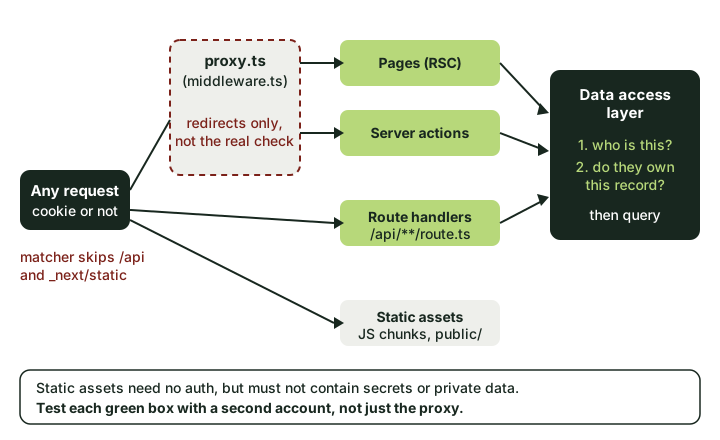 Every entry point needs its own check. With the usual matcher, the proxy never sees
/api at all.
The fix is not a better matcher. Keep the proxy for redirects and the "you need to sign in" experience, and put the actual check where data is read or changed. In practice that is one server-only module:
// lib/dal.ts
import 'server-only'
import { cache } from 'react'
import { cookies } from 'next/headers'

export const requireUser = cache(async () => {
  const token = (await cookies()).get('session')?.value
  const user = token ? await verifySession(token) : null
  if (!user) throw new Error('Unauthorized')
  return user
})
Every page, action and route handler that touches private data calls requireUser() and then checks ownership of the specific record. Next.js calls this pattern a Data Access Layer in its data security guide, and it is the one I would ask a generated app to adopt.
Server actions are public POST endpoints
Anything in a 'use server' file that the client can reference becomes callable with a direct POST, not just through your UI. Next.js gives the action an encrypted, non-deterministic ID and drops unused actions from the build, which helps. It is not access control. A July 2026 advisory was specifically about action IDs being disclosed through publicly served JavaScript chunks, and its workaround was the same advice as always: authenticate inside the action.
The common bug in generated code is this shape:
'use server'
export async function deleteProject(projectId: string) {
  await db.project.delete({ where: { id: projectId } })
}
The page that renders the delete button checks the session. The action doesn't. A page-level check does not extend to actions defined on it, and the Next.js docs say so in as many words. The fixed version checks both who you are and whether the record is yours:
'use server'
export async function deleteProject(projectId: string) {
  const user = await requireUser()
  const project = await db.project.findUnique({ where: { id: projectId } })
  if (!project || project.ownerId !== user.id) throw new Error('Forbidden')
  await db.project.delete({ where: { id: projectId } })
  return { ok: true }
}
Two other things to look for while you are in these files. Return values are serialised and sent to the browser, so return db.user.update(...) hands over the whole row, password hash column and all if you have one. And arguments are attacker-controlled: an action that takes userId or role from the client is asking to be edited.
How to test it yourself. Sign in as user A, trigger the action, and in the browser's Network tab use "Copy as cURL" on the request (it carries a Next-Action header). Replay it from a terminal with user B's cookie, and again with no cookie at all. If the record still disappears, you have found the bug. Do this on a staging copy, obviously, since it really does delete things.
Route handlers without auth
Every app/**/route.ts is a public URL. List them:
find app src/app \( -name 'route.ts' -o -name 'route.js' \) 2>/dev/null
If the app also has a Pages Router, every file under pages/api is an endpoint too.
For each one, ask three questions: does it read the session, does it check the caller owns the resource named in the URL or body, and does a GET change anything? Then try it unauthenticated:
curl -i https://your-preview-url.vercel.app/api/projects/123
A 401 or 403 is what you want. A 200 with JSON is a finding, unless the data is meant to be public. Folders in brackets, like [id], are user input; changing 123 to 124 while signed in as somebody else is the whole test. Webhook handlers are the honest exception, since Stripe will not send your cookie, and they need webhook signature verification instead.
Data leaking through server component props and the RSC payload
This one surprises people. A server component that passes a database row to a client component sends every field of that row to the browser, serialised into the page. It is not rendered, so you never see it on screen, but it is in the HTML.
// Leaks every column of the user row to the browser
const user = await db.user.findUnique({ where: { id } })
return <ProfileCard user={user} />
Check it without reading any code. Open a signed-in page, view source, and search for self.__next_f.push. In current versions the App Router puts the RSC payload in those inline script tags. Now search the source for things that should not be there: stripe_customer_id, password, role, internal, another user's email. Client-side navigations fetch the same payload as separate requests marked with an RSC header or an _rsc query parameter, so check a couple of those in the Network tab too.
The fix is to pass only the fields the component renders, or to return a small object from your data layer. Next.js also has an experimental taint API (experimental.taint in next.config) that throws if a marked object crosses to the client. Useful as a backstop, not a replacement for passing less.
NEXT_PUBLIC_ variables
Anything prefixed NEXT_PUBLIC_ is inlined into the JavaScript at build time. That is the whole rule, and it is covered in detail, with a build-output check, in NEXT_PUBLIC_ vs secret key. For this checklist, just run:
grep -rn --exclude-dir=node_modules --exclude-dir=.next "NEXT_PUBLIC_" \
  --include='*.ts' --include='*.tsx' --include='*.js' --include='.env*' . \
  | grep -iE "secret|service|private|sk_|key"
and justify every hit. (The quotes around the globs matter in zsh, which otherwise tries to expand them itself.) A NEXT_PUBLIC_SUPABASE_SERVICE_ROLE_KEY is not a naming problem; it is an incident, and the service role key runbook applies.
Preview deployments are part of your attack surface
Every branch push to Vercel creates a deployment with its own URL. Two things go wrong.
First, protection. Open Project Settings, then Deployment Protection, and confirm what is actually set. Vercel's Standard Protection covers every deployment except your production domains, using Vercel Authentication or another method. Do not assume it is on because a newer project had it on; check this project. Shareable links and the "protection bypass for automation" secret both let people through, so know who has them.
Second, data. Preview deployments often get the same environment variables as production because someone ticked all three boxes when adding them. A protected preview pointed at the production database is still a second copy of your app, built from an unreviewed branch, with production credentials. Give Preview its own database and keys.
Also check that production source maps are off (productionBrowserSourceMaps is false by default, so look for someone turning it on) and that nothing in public/ should not be there. Exposed .env file? covers the curl checks for stray files.
Security headers via next.config
Next.js sends very few security headers by default. Add a baseline in next.config.ts:
const securityHeaders = [
  { key: 'Strict-Transport-Security', value: 'max-age=63072000; includeSubDomains' },
  { key: 'X-Content-Type-Options', value: 'nosniff' },
  { key: 'Referrer-Policy', value: 'strict-origin-when-cross-origin' },
  { key: 'X-Frame-Options', value: 'DENY' },
  { key: 'Permissions-Policy', value: 'camera=(), microphone=(), geolocation=()' },
]

const nextConfig = {
  poweredByHeader: false,
  async headers() {
    return [{ source: '/:path*', headers: securityHeaders }]
  },
}

export default nextConfig
Verify with curl -sI https://your-app.com | grep -iE "strict|nosniff|referrer|frame|permissions". A Content Security Policy is worth doing, but a nonce-based one has to be set in the proxy rather than here and it makes pages dynamic; follow the Next.js CSP guide rather than pasting a policy from a blog (including this one). Headers are good hygiene. They do not fix any of the access control problems above, and I would not delay a launch over a missing Permissions-Policy.
Dependency audit
npm audit --omit=dev
npm outdated next react react-dom
npm audit will be noisy. Prioritise advisories in next, react-server-dom-* and anything that runs on the server. December 2025's critical React Server Components remote code execution bug (CVE-2025-55182) is the reminder here: a framework patch can matter more than anything in your own code. A high-severity finding in a build-only tool can usually wait a week.
What an automated Next.js security scan finds, and what it misses
Run a scanner by all means. Just know which rows of this table it can fill in.
| Check | Automated scanner | Needs a person or two test accounts |
|---|---|---|
Outdated next with known CVEs |
Yes (npm audit, Dependabot) |
|
| Missing security headers | Yes, from the public URL | |
| Secrets in the browser bundle | Usually, if the key has a known format | Judging whether it matters |
| Unprotected preview URLs | Partly, if it knows the URLs | |
| Route handler with no auth | Sometimes, if it finds the route | Confirming it returns private data |
| Server action with no ownership check | Rarely | Yes |
| User B reading user A's record by ID | No | Yes |
| Extra fields in the RSC payload | No, it does not know what is private | Yes |
The pattern is simple. Scanners are good at things that look the same in every app: versions, headers, key formats. They cannot know that project 124 belongs to someone else, because that is a fact about your data, not your code. That gap is why the five checks for "can other users see my data" are done with two real accounts, and it is exactly what our two-account check does on a live Next.js app. If you want the wider, framework-agnostic version of this list, the vibe coding security checklist has it.
A short order of work
If you only have a couple of hours, do it in this order: upgrade next; find every action and route handler and add requireUser() plus an ownership check; replay three requests as the wrong user; view source on a signed-in page and search the RSC payload; check preview protection and preview env vars; add headers. Then, and only then, run a scanner, because it will tell you about the easy things you have already fixed.