 BYTEASSUREStart a review
An exposed .env file is one of the few security problems you can check in under a minute: ask your own site for /.env and see what comes back. The catch is reading the answer. Most modern front ends return a cheerful 200 OK for every path you ask for, because the app's router wants to handle it, so a naive check either panics you over nothing or, worse, teaches you to ignore the one response that matters. This guide covers how .env, .git, source maps and backup files end up publicly served, the short list of paths worth checking, how to tell a real hit from the SPA fallback, the fix on Vercel, Netlify, Cloudflare Pages and nginx, and what to rotate if you find something.
One rule before any commands: only run these checks against sites you own or have written permission to test. Requesting /.env on someone else's domain is probing their infrastructure, whatever your intentions.
How the files get there in the first place
A web server serves whatever is in the directory it was pointed at. Nobody sets out to publish their .env; they point the server at the wrong directory, or copy too much into the right one. The usual routes:
- The project root is the web root. A plain static site, or an app deployed with no build step, gets served from the repository folder itself. Everything in that folder is now a URL:
.env,.git/,docker-compose.yml,notes.txt. This is the classic PHP and shared-hosting failure, and it still happens with "drag the folder onto the host" deploys. - The build output directory is set wrong. Vite builds into
dist, Create React App intobuild, Next.js static export intoout. If the host's publish or output directory is set to.(or left blank on a host that falls back to the root) you deploy the source tree, not the build. - Something copies secrets into the output. A build script that does
cp -r . dist, apublic/folder someone dropped a config file into (Vite copiespublic/into the output verbatim), or a generatedconfig.jsonwritten during the build from server-side variables. - Source maps ship to production. Source maps are not secrets in themselves, but they hand over your original source, comments and all, which is exactly where a hardcoded key or an internal URL tends to live. Vite's
build.sourcemapdefaults tofalse; plenty of templates and generated apps turn it on. - Editor and backup leftovers.
index.php.bak,config.js.old,.env.save,backup.zip,.DS_Store. OWASP's testing guide has a whole section on old, backup and unreferenced files for this reason. - Docker images. Not a URL, but the same mistake.
COPY . .in a Dockerfile copies whatever is in the build context,.envand.gitincluded, unless a.dockerignoreexcludes them. Docker's docs describe.dockerignoreas the way to keep files out of the context. Anyone who can pull the image can read the layers, and deleting the file in a later layer does not remove it from the earlier one.
A .git folder deserves its own sentence. Even with directory listing switched off, a served .git/ usually lets someone rebuild the repository by requesting known paths (HEAD, config, index, then objects by hash). That means the whole history, including the .env you committed in week one and deleted in week two.
The exposed .env file scan: a short list of paths
You do not need a scanner with ten thousand paths. On an app built with an AI tool or a modern framework, these cover most of what goes wrong:
| Path | What a real hit looks like |
|---|---|
/.env |
Plain text lines of NAME=value |
/.env.local, /.env.production, /.env.development |
Same |
/.git/HEAD |
One line, ref: refs/heads/main (or similar) |
/.git/config |
Starts with [core], often includes the remote URL |
/.DS_Store |
Binary, application/octet-stream |
/docker-compose.yml, /Dockerfile |
YAML or Dockerfile text, often with environment blocks |
/backup.zip, /site.zip, /db.sql |
Binary or SQL text, large |
Your main JS bundle plus .map |
JSON starting {"version":3 with a sources array |
For the source map, open your production page, find the main script tag (something like /assets/index-a1b2c3.js), and check the end of that file for a sourceMappingURL comment. Then request the same path with .map added. Some builds produce maps but strip the comment (Vite's 'hidden' option does this), so try the .map URL even when the comment is missing.
Checking with curl, and reading the answer properly
Start with a baseline: a path that definitely does not exist. This tells you how your host answers a miss.
SITE=https://your-domain.example

# 1. Baseline: what does a guaranteed miss look like?
curl -s -o /tmp/miss.html -w "%{http_code} %{content_type} %{size_download}\n" \
  "$SITE/this-path-does-not-exist-$(date +%s)"

# 2. The homepage, for comparison
curl -s -o /tmp/home.html -w "%{http_code} %{content_type} %{size_download}\n" "$SITE/"

# 3. The candidates
for p in .env .env.local .env.production .git/HEAD .git/config .DS_Store \
         docker-compose.yml backup.zip; do
  printf "%-22s " "$p"
  curl -s -o "/tmp/probe.out" -w "%{http_code} %{content_type} %{size_download}  " "$SITE/$p"
  head -c 60 /tmp/probe.out | tr -d '\n'; echo
done
Use a GET, not curl -I. Some hosts answer HEAD requests differently, and you need the body to tell a real file from the fallback page. Keep the output to yourself: if a real .env comes back, those values are now on your screen and in /tmp/probe.out, so delete that file once you have finished.
Now read the results like this.
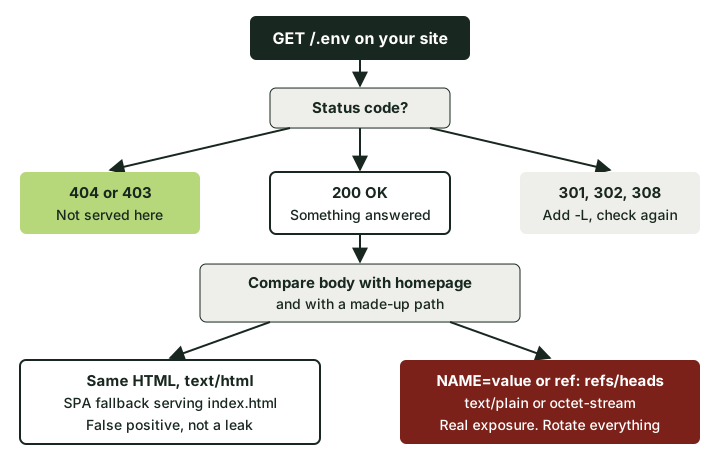 A 200 only means something answered. The body tells you what.
404 or 403. Not served, at least not at that path on this domain. Good.
301, 302 or 308. Usually HTTP to HTTPS, or a trailing-slash redirect. Add -L and look at where it lands.
200 with text/html and a body the same size as your homepage. This is the SPA fallback, and it is the false positive that catches almost everyone. Single-page apps are deployed with a catch-all rule (Netlify's /* /index.html 200, a Vercel rewrite, or Cloudflare Pages' automatic behaviour: when a project has no top-level 404.html, Pages assumes it is a single-page app and serves the root for any path that does not match an asset). So /.env returns your homepage HTML with a 200. Confirm by comparing with the baseline:
cmp -s /tmp/home.html /tmp/probe.out && echo "same as homepage: fallback, not a leak"
If your baseline miss also came back as a 200 with the homepage, every "hit" with the same size and content type is the fallback. (Sizes can differ by a few bytes if the page embeds a nonce or build ID, so look at the first lines too.)
200 with text/plain or application/octet-stream, and a body that looks like the file. That is a real exposure. .env shows KEY=value lines; .git/HEAD shows ref: refs/heads/.... Stop reading values and go to the rotation section.
200 with a body that is neither. Some hosts return a custom "not found" page with a 200 status. Read the first few lines and decide; this is why the loop prints them.
A clean result here does not mean nothing leaked. This checks a handful of paths on one hostname. It will not find the key compiled into your JavaScript bundle (that is a different check, covered in API key in frontend code), files under a path you did not guess, or an old preview deployment on a different URL that still serves last month's mistake.
The fix, host by host
The real fix is the same everywhere: the directory your host serves should contain only build output, and secrets should live in the host's environment variable settings rather than in a file in that directory. The per-host details below are how you get there and how you add a backstop.
Vercel
Check Project Settings > Build and Deployment: the framework preset, and the Output Directory. For a Vite app the output should be dist; for Next.js leave the preset to handle it. If the preset is "Other" with no build command, Vercel serves your project files as they are, so anything at the root is a candidate URL.
Vercel's CLI skips a default list of files on upload. The list includes .git, .env.local and .env.*.local, but not a plain .env or .env.production. Add a .vercelignore at the project root as a backstop:
.env
.env.*
*.map
*.bak
*.sql
Put the actual values in Settings > Environment Variables. Remember that any variable with a public prefix (NEXT_PUBLIC_, VITE_) is compiled into the browser bundle anyway, which is a separate problem with the same ending.
One Vercel-specific trap: each deployment keeps its own URL. If an old deployment served .env, fixing the latest one does not fix that URL. Check which scope your Deployment Protection uses, and delete deployments that contained the file.
Netlify
Check Site configuration > Build & deploy > Publish directory. It should be the build output (dist, build, out), never the repository root. Netlify publishes only that directory, so if it is right, files outside it are not served. Community reports suggest some deploy methods drop dotfiles anyway; do not rely on that, check with curl.
As a backstop you can force a 404 for sensitive paths in _redirects. The ! matters: without it, Netlify serves an existing file in preference to the rule (they call this shadowing, and the redirect options docs explain it):
/.env              /404.html  404!
/.env.local        /404.html  404!
/.env.production   /404.html  404!
/.git/*            /404.html  404!
Keep these above your SPA catch-all line, because rules are matched top to bottom. Netlify's splat (*) only works at the end of a path, so you cannot write a neat /*.map rule; if you do not want source maps public, stop the build producing them, or delete them from the output in the build command (vite build && find dist -name '*.map' -delete).
Cloudflare Pages
Check the project's Build output directory. If it is / or blank on a project with no build step, the whole repository is the site. Set it to your build folder.
Cloudflare Pages' _redirects cannot return a 404 (it supports 301, 302, 303, 307, 308 and 200 proxying), so you cannot block a file there the way you can on Netlify. You can still redirect it away, since Pages follows redirects even when an asset matches, but treat that as a sticking plaster. The fix is keeping the file out of the output directory.
nginx (and anything self-hosted)
Point root at the build output, not the project. Then refuse dotfiles and backups as a backstop, keeping .well-known reachable for certificates:
location ~ /\.(?!well-known/) {
    return 404;
}

location ~* \.(bak|old|orig|save|swp|sql|zip|tar|gz)$ {
    return 404;
}
A plain return 404 is enough, and unlike a 403 it does not confirm the file exists. These are regex location blocks, so their order relative to your other regex locations matters (nginx uses the first regex location that matches, in the order they appear). Reload, then run the curl loop again. Do not trust the config by reading it.
Docker images
Add a .dockerignore next to the Dockerfile:
.env
.env.*
.git
*.map
node_modules
Pass secrets at runtime (environment, a secrets manager, or BuildKit's --secret for build-time needs) rather than copying files in. If an image with a .env was ever pushed to a registry anyone else can pull, treat the secrets as exposed even after you rebuild.
If you found a real file: rotate first, tidy later
Assume every value in the file has been read. Files at predictable paths get requested constantly by automated scanners, and you have no way to prove nobody fetched it. Removing the file stops future reads; it does nothing about past ones.
- Rotate every credential in the file, starting with the dangerous ones: database URLs with passwords, service-role or admin keys, payment secret keys, webhook signing secrets, SMTP and cloud credentials. Rotate means issue a new value at the provider, deploy it, then revoke the old one. If a Supabase service-role key was in there, follow the service role key runbook.
- Remove the file from the served output using the fixes above, redeploy, and re-run the curl loop until you get a 404 or the confirmed fallback.
- Kill the old copies. Older deployments, preview URLs, CDN caches, Docker images in registries. If
.gitwas exposed, everything ever committed is in scope, not just the current.env; a secret scan of the full Git history tells you what that includes. - Check the provider logs for use of the old credentials between the first deploy that contained the file and the moment you revoked them. Most providers show API key usage by key, IP or time.
- Write down the window: first exposed deploy, fix deploy, rotation time. You will want it if you need to tell users or answer a customer's security questionnaire later.
What this check will not tell you
A missing .env is a good sign and a low bar. The more expensive leaks in apps built with AI tools are usually not files at all. They are database rules that let one signed-in user read another user's rows, or tables readable with the public key. A curl loop will never see those, because the server is behaving exactly as configured. If you want an outside look at the public surface (headers, exposed files, keys in the bundle) without anyone logging in, that is what a public-site snapshot covers. If you want the access-control question answered, it needs two real accounts trying to reach each other's data. You can run the five checks for whether other users can see your data yourself, or book the 5-Day Two-Account Check, which runs them on your live app with the request and response for each.