 BYTEASSUREStart a review
If your admin page is only hidden in the UI, any signed-in user can probably use it. Hiding the "Admin" link, redirecting non-admins away from /admin, or checking user.role === "admin" in a React component changes what people see. It does not change what the server will do when somebody sends the same request the admin page sends. That is the whole problem, and it shows up constantly in apps built quickly with Lovable, Bolt, Cursor or v0, because the generated code makes the menu look right first.
This guide is about the admin side specifically: how to find the admin endpoints the interface hides, how to test them from an ordinary account, and where the role check has to live. For the related problem of one customer reaching another customer's records, see multi-tenant authorisation; this article is about one user promoting themselves.
Why an admin page hidden in the UI is not access control
Here is the pattern, more or less as code generators write it:
// Shows the link only to admins. Fine as UX.
{profile?.is_admin && <Link to="/admin">Admin</Link>}

// Redirects non-admins. Also only UX.
useEffect(() => {
  if (profile && !profile.is_admin) navigate("/");
}, [profile]);
Both checks run in the user's browser, on data the user's browser fetched. The user can switch them off, edit the value they read, or skip the page entirely and call the backend. The admin page is a client for some set of backend operations (list all users, change a plan, issue a refund, delete a post), and those operations are the thing to protect.
Route guards don't change this. A TanStack Router beforeLoad, a React Router loader or a Next.js middleware.ts (renamed proxy.ts in Next.js 16) decides whether to render a page. The TanStack Start authentication guide says it directly: server functions and server routes are API endpoints reachable independently of the route that calls them, auth belongs in the handler or middleware for that endpoint, and beforeLoad is for route UX. The Next.js data security guide makes the same point about Server Actions: each one is reachable by a direct POST request, and a page-level authentication check does not extend to the actions defined in that page. (Next.js also had a real middleware bypass in 2025, CVE-2025-29927, which is a neat illustration of why a single gate in front of everything is a bad bet.)
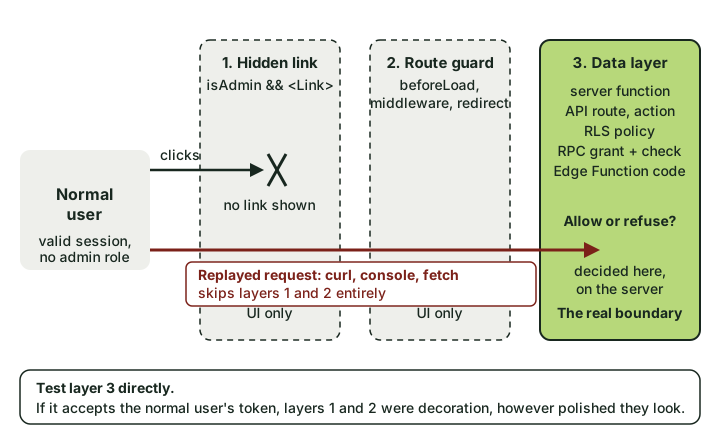 The first two layers only stop people who use your app the way you expected. The third is the one that counts.
Where admin power actually lives
Before testing, list what an admin can do and how the browser does it. In a typical AI-built app the admin page reaches the backend through some mix of these:
| Surface | How the browser calls it | What decides who may call it |
|---|---|---|
| Supabase tables | GET/PATCH/DELETE /rest/v1/<table> with the user's JWT |
RLS policies and table grants |
| Supabase RPC | POST /rest/v1/rpc/<function> |
EXECUTE grants, plus any check inside the function |
| Supabase Edge Function | POST /functions/v1/<name> |
Your code in the function. verify_jwt only checks that a valid token is present |
| Next.js Server Action or route handler | POST with a Next-Action header, or a normal fetch to /api/... |
Your code in the action or handler |
| TanStack Start server function | Same-origin fetch to the server function endpoint | Middleware attached to that function, or a check inside it |
| Storage buckets | /storage/v1/object/... |
Storage policies on storage.objects |
Two of those deserve a second look. Postgres grants EXECUTE on new functions to PUBLIC by default, so a function you wrote for the admin page is callable by anyone with your public key unless you revoked that (Supabase database functions covers the revoke). If it is security definer, it also runs with its owner's privileges and ignores RLS. And an Edge Function with the default verify_jwt = true accepts any signed-in user's token; on projects still using the legacy JWT-format keys, the anon key itself is a valid JWT. Neither setting knows what an admin is.
How to find the admin endpoints the UI hides
You do not need to be clever here. You built the app, so you can see the admin page work.
1. Record what the admin page sends. Log in as an admin, open DevTools, go to Network, filter by Fetch/XHR, and use every admin feature once. Right-click each request and choose Copy as cURL. You now have the exact list of operations to protect, which is better than any guess.
2. Search the shipped JavaScript. The admin page's code is usually in the bundle even for users who never see it (lazy-loaded chunks still get served to anyone who asks). In DevTools, Cmd+Option+F (Ctrl+Shift+F) and search for rpc(, functions.invoke, /admin, is_admin, role === and service_role. Chunk file names are often a giveaway too, something like Admin-3f9c1a.js.
3. Grep the source.
grep -rnE "\.rpc\(|functions\.invoke\(|createServerFn|'use server'|\"use server\"|is_admin|user_metadata" src app supabase 2>/dev/null
Anything matching user_metadata near the word "role" is a strong lead. So is any server function that does not visibly check who is calling it.
4. List your database functions and who can run them. In the Supabase SQL editor:
select p.proname,
       p.prosecdef as security_definer,
       has_function_privilege('anon', p.oid, 'execute') as anon_can_run,
       has_function_privilege('authenticated', p.oid, 'execute') as users_can_run
from pg_proc p
where p.pronamespace = 'public'::regnamespace
order by 1;
Any admin-ish function (delete_user, set_plan, grant_credits, get_all_orders) with users_can_run = true needs a role check inside it, or it is open to every account.
Test it as a normal user
Create a fresh account with no special role. Log in as that user in a separate browser profile, open DevTools, and take its access token. In a Supabase app it sits in local storage under a key like sb-<project-ref>-auth-token; copy the access_token value. Never paste anyone else's token anywhere, and only test an app you own or have written permission to test.
Set up your shell (these values are your own project URL, public key and the normal user's token):
export SB=https://<project-ref>.supabase.co
export ANON=<your publishable or anon key>
export TOKEN=<the normal user's access_token>
Replay the admin requests
Take each cURL you copied as admin and swap the admin's Authorization: Bearer value for $TOKEN. For example:
# Read a table only admins should list
curl "$SB/rest/v1/profiles?select=id,email,is_admin" -H "apikey: $ANON" -H "Authorization: Bearer $TOKEN"

# Call an admin RPC directly
curl -X POST "$SB/rest/v1/rpc/set_user_plan" -H "apikey: $ANON" -H "Authorization: Bearer $TOKEN" \
  -H "Content-Type: application/json" -d '{"target_user": "<another user id>", "plan": "pro"}'

# Call an admin Edge Function
curl -X POST "$SB/functions/v1/admin-refund" -H "apikey: $ANON" -H "Authorization: Bearer $TOKEN" \
  -H "Content-Type: application/json" -d '{"order_id": "<an order id>"}'
For Next.js Server Actions, replaying from the Network tab with Copy as fetch, while logged in as the normal user, is easier than hand-building the request.
Give yourself a role through user_metadata
Supabase lets a signed-in user edit their own user_metadata. The Supabase RLS docs say it can be updated by the user and is not a good place for authorisation data. So try it:
curl -X PUT "$SB/auth/v1/user" -H "apikey: $ANON" -H "Authorization: Bearer $TOKEN" \
  -H "Content-Type: application/json" -d '{"data": {"role": "admin", "is_admin": true}}'
The same thing can be done at sign-up through options.data. Then sign out and back in (the role only appears in a newly issued token) and replay the admin requests with the new token. If the admin page now appears, the frontend trusts it. If the replayed requests now succeed, RLS policies or server code trust it too, and that is the serious finding. Look for policies containing auth.jwt() -> 'user_metadata'. Supabase's Security Advisor flags those policies (lint 0015_rls_references_user_metadata, covered in the Supabase RLS audit), but it cannot see the same mistake in an Edge Function or a Server Action.
Flip is_admin on your own profile
A profiles table with an is_admin column, and a policy letting users update their own row, is the single most common version of this. The policy was meant for the display name. It also covers is_admin.
curl -X PATCH "$SB/rest/v1/profiles?id=eq.<your own user id>" -H "apikey: $ANON" -H "Authorization: Bearer $TOKEN" \
  -H "Content-Type: application/json" -H "Prefer: return=representation" -d '{"is_admin": true}'
Try the same column on insert if users can create their own profile row, and try role, plan, credits and is_verified while you are at it. They usually fail the same way.
What good and bad look like
| Result | Meaning |
|---|---|
401, 403, or Postgres error 42501 |
The server refused. Good. |
200 with [] on a read |
RLS filtered everything out. Good. |
200 with [] on a PATCH (or 204 if you left out Prefer: return=representation) |
No row matched, usually because RLS filtered it out. Re-read the row as the owner to confirm nothing changed. |
200 with other users' rows, or your row now showing is_admin: true |
Fail. Stop and fix before launch. |
| Edge Function or RPC does the action | Fail, regardless of what the UI shows. |
False alarms
Being able to download the admin page's JavaScript is not a vulnerability on its own. Code is not data, unless it contains a secret (a service_role key in an admin chunk is a separate and worse problem, covered in the service role runbook). A role guard that flashes the admin page for a split second before redirecting is untidy but harmless if every request behind it fails. And seeing your edited user_metadata.role inside your own JWT proves nothing until something trusts it.
The fix: put the role where users cannot write it
Store the role somewhere the user has no write access to. Two reasonable options in Supabase:
app_metadata, which users cannot update. Set it from trusted server code with the secret key, for examplesupabase.auth.admin.updateUserById(id, { app_metadata: { role: "admin" } }).- A
user_rolestable with no grants toanonorauthenticatedat all, copied into the token with a Custom Access Token hook. The Supabase RBAC guide walks through exactly this, including revoking table access fromauthenticated, anon, public.
Take the flag out of user-editable rows. If is_admin must stay on profiles, stop users writing that column:
revoke update on public.profiles from anon, authenticated;
grant update (full_name, avatar_url) on public.profiles to authenticated;
Column grants sit alongside RLS. RLS decides which rows a user may update; the grant decides which columns. Moving the flag to its own table is cleaner, but this closes the hole today.
Check the role in the database for admin tables. A small helper keeps policies readable:
create or replace function public.is_admin()
returns boolean
language sql stable security definer set search_path = ''
as $$
  select exists (select 1 from public.user_roles where user_id = auth.uid() and role = 'admin');
$$;

create policy "Admins read all orders" on public.orders
  for select to authenticated using ((select public.is_admin()));
Lock down every admin function. Revoke first, grant back deliberately, and still check inside, because a grant to authenticated means every signed-in user:
revoke execute on function public.set_user_plan(uuid, text) from public, anon, authenticated;
grant execute on function public.set_user_plan(uuid, text) to authenticated;
-- and inside the function body:
-- if not public.is_admin() then raise exception 'forbidden' using errcode = '42501'; end if;
Check the role inside server code, every time. In an Edge Function, a Server Action or a TanStack Start server function, get the user from the verified token, look up their role from the trusted source, and refuse before doing anything:
const { data: { user } } = await supabase.auth.getUser(); // verifies the token with Supabase
if (!user || user.app_metadata?.role !== "admin") {
  return new Response("Forbidden", { status: 403 });
}
In TanStack Start, put that in a middleware and attach it to every admin server function, so a new function cannot forget it. In Next.js, a shared requireAdmin() called at the top of each action does the same job.
Keep hiding the admin link. It is good UX. It just isn't the lock.
One trade-off worth knowing: a role carried in the JWT stays valid until the token expires (an hour by default on Supabase). If removing an admin must take effect immediately, check the user_roles table on sensitive operations rather than trusting the claim alone.
Verify the fix
Repeat every test from the normal account with a fresh token: replay each admin request, set user_metadata.role again and sign back in, PATCH is_admin on your own row, call each admin RPC and function. Every one should be refused. Then do the admin's job as an admin to confirm you have not locked yourself out (it happens). Re-run the function-privilege query and check that nothing admin-shaped is still executable by authenticated without a check inside.
If you want the broader set of checks a normal user should fail, the five checks for whether other users can see your data are the natural next step, and OWASP's Authorization Cheat Sheet is a good reference for the principles. Broken access control sits at the top of the OWASP Top 10 for a reason: it is easy to build, invisible in the UI, and very easy to test once you stop clicking and start sending requests.